Anatomy of a Domain: TLD, SLD, Subdomain Explained
Print- 0
Anatomy of a Domain: TLD, SLD, Subdomain Explained
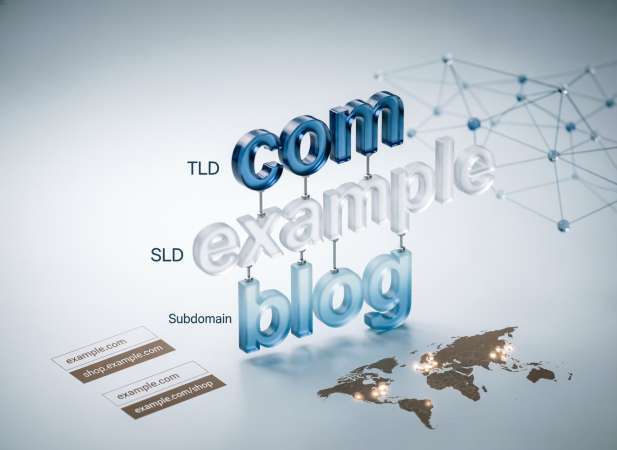
Every website address you type into a browser follows a precise structure—but do you know what each part actually means? Understanding the anatomy of a domain name is essential for anyone building an online presence, whether you're a beginner launching your first site or a business owner managing multiple web properties. This article breaks down the three core components of any domain: the Top-Level Domain (TLD), the Second-Level Domain (SLD), and subdomains. We'll explain what each piece represents, how they work together, and why knowing the difference matters for your website's structure, branding, and technical setup. At Madar Host, we believe that clarity about these fundamentals empowers you to make smarter decisions when registering domains and planning your site architecture. By the end of this guide, you'll confidently navigate domain terminology and apply this knowledge to your own projects.
What Is a Domain Name Made Of?
A domain name is a structured identifier within the Domain Name System (DNS) hierarchy—translating complex IP addresses into intuitive, human-readable labels. Its architecture follows a precise technical framework designed for global routing, security validation, and organizational clarity. Far from arbitrary, each segment serves a distinct operational purpose in how browsers, servers, and email systems interpret your digital address.
Every fully qualified domain name (FQDN) comprises three interdependent layers:
- Top-Level Domain (TLD): The suffix (e.g., .com, .org, .sa) regulated by ICANN-accredited registries, indicating purpose, geography, or community.
- Second-Level Domain (SLD): The primary registrable string (e.g., "yourbusiness" in yourbusiness.com), forming your core brand identifier within the DNS namespace.
- Subdomain: A delegated subdivision (e.g., shop.yourbusiness.com) configured via DNS records to logically segment services, environments, or content without new registration.
Grasping this anatomy is foundational for accurate DNS configuration, SSL certificate deployment, email server setup, and avoiding critical issues like canonicalization conflicts or misrouted traffic. Whether provisioning hosting environments, implementing CDN strategies, or securing domain assets, understanding these components ensures precise control over your infrastructure. This structural literacy directly supports robust online operations and informed domain management decisions.
Understanding the Top-Level Domain (TLD)
The Top-Level Domain (TLD) is the rightmost segment of a domain name—the suffix that follows the final dot. Positioned at the apex of the DNS hierarchy, TLDs serve as the foundational classification layer within the global domain namespace. Managed by ICANN-accredited registry operators, each TLD maintains its own authoritative zone file, governing registration policies, technical specifications, and lifecycle management for millions of domains beneath it.
TLDs fall into several distinct categories, each with unique governance and intended use cases:
- Generic TLDs (gTLDs): Originally purpose-driven (.com for commercial, .org for organizations, .net for networks), now broadly available. Newer gTLDs like .app, .shop, and .blog offer semantic specificity for niche markets.
- Country Code TLDs (ccTLDs): Two-letter codes representing sovereign nations (.sa for Saudi Arabia, .uk for United Kingdom), often requiring local presence or residency for registration.
- Sponsored TLDs (sTLDs): Restricted to specific communities or industries (.edu for educational institutions, .gov for government entities), with eligibility verification enforced by sponsoring organizations.
- Infrastructure TLD: The .arpa domain, reserved for Internet infrastructure purposes like reverse DNS lookups.
From a technical standpoint, TLDs influence DNS resolution paths, affect SSL certificate validation scope, and may carry SEO implications for geographic targeting. Choosing the appropriate TLD requires consideration of brand alignment, audience expectations, regulatory requirements, and long-term domain portfolio strategy. Understanding these distinctions ensures informed registration decisions and aligns your domain selection with operational objectives.
Common TLD Types and Their Uses
Understanding TLD categories helps align your domain selection with business objectives and technical requirements. Here's a practical breakdown of widely used extensions and their typical applications:
- .com — The most recognized commercial TLD globally. Ideal for businesses targeting international audiences, offering maximum memorability and brand neutrality.
- .net — Originally designated for network infrastructure, now commonly used by tech companies, ISPs, and as an alternative when .com is unavailable.
- .org — Associated with non-profit organizations, open-source projects, and community initiatives. Conveys institutional credibility.
- .io — Popular among tech startups, SaaS platforms, and developer tools. Derived from the British Indian Ocean Territory, it has become synonymous with innovation and technology.
- .co — Short for "company" or "corporation." Frequently adopted by modern startups and businesses seeking a concise, professional alternative to .com.
- .store / .shop — E-commerce focused extensions that immediately signal commercial intent. Useful for online retailers and digital storefronts.
- .blog — Dedicated to content publishers, personal journals, and editorial platforms. Enhances topical relevance for blogging ventures.
- .me — Personal branding TLD for portfolios, resumes, and individual online presence. Also used for URL shortening and call-to-action links.
- .app — Google-backed TLD requiring HTTPS by default. Designed for mobile applications, web apps, and software services.
- .dev — Targeted at developers, coding projects, and technical documentation. Also enforces HTTPS for enhanced security.
- .ai — Associated with artificial intelligence, machine learning, and tech innovation. Increasingly adopted by AI-focused startups and research entities.
When selecting a TLD, consider audience perception, industry conventions, availability of your preferred name, and potential trademark conflicts. The right extension reinforces your domain's purpose while supporting long-term digital strategy.
How TLDs Affect Trust and SEO
TLD selection carries measurable implications for both user perception and search visibility. While modern search algorithms have evolved beyond simplistic TLD bias, certain extensions still influence credibility signals and ranking factors.
User Trust and Brand Perception
Established TLDs like .com and .org benefit from decades of user familiarity, often perceived as more legitimate than newer or obscure extensions. Industry-specific TLDs (.bank, .law) signal specialization and may undergo stricter verification processes, enhancing trust. Conversely, certain TLDs historically associated with spam or low-quality content may trigger user skepticism, regardless of actual site quality.
SEO Considerations and Technical Factors
Google has publicly stated that most gTLDs receive equal treatment in ranking algorithms. However, country-code TLDs (ccTLDs) serve as strong geographic signals for local SEO, automatically associating content with specific regions without additional hreflang configuration. Newer TLDs like .app and .dev enforce HTTPS by default through preloaded HSTS policies, indirectly supporting security-related ranking factors.
Practical Implications
Brand memorability often outweighs minor SEO differences—users are more likely to recall and directly type a .com address. For local businesses, ccTLDs can improve regional visibility but may limit perceived global reach. When migrating domains or launching multilingual sites, TLD choice affects canonicalization strategy, backlink equity transfer, and international targeting implementation.
Ultimately, TLD impact on SEO is secondary to content quality, site architecture, and user experience. However, aligning your extension with audience expectations and business scope creates consistency across branding, technical setup, and search performance.
Breaking Down the Second-Level Domain (SLD)
The Second-Level Domain (SLD) represents the core registrable component of your domain name—the unique string positioned directly to the left of the TLD separator. In "example.com," "example" constitutes the SLD, serving as your primary namespace identifier within the DNS hierarchy. Unlike TLDs governed by registry operators, the SLD is the segment you directly control, register, and brand as your digital identity.
Technically, the SLD functions as a delegation point within the DNS tree. When you register an SLD, the TLD registry creates a zone file entry that delegates authority for all subdomains beneath it to your designated name servers. This delegation enables you to manage DNS records—including A, CNAME, MX, and TXT entries—governing website hosting, email routing, SSL validation, and service discovery across your entire domain ecosystem.
From a strategic perspective, the SLD forms the foundation of your online branding architecture. It should balance memorability, phonetic clarity, and trademark safety while avoiding hyphens, numbers, or ambiguous spellings that complicate user recall. Domain availability constraints often necessitate creative variations, but maintaining semantic relevance to your business name or service offering strengthens brand cohesion.
Registration of an SLD occurs through ICANN-accredited registrars, with ownership documented in WHOIS databases (subject to privacy protections where available). Renewal cycles, transfer locks, and registry grace periods apply specifically to the SLD-TLD combination, making proper domain portfolio management essential for continuity. Understanding the SLD's role clarifies how domain ownership, DNS control, and subdomain delegation interconnect within your infrastructure.
Choosing a Strong and Memorable SLD
Selecting an effective Second-Level Domain requires balancing branding objectives, user experience, and technical practicality. The SLD serves as your primary digital identifier—investing thoughtful consideration upfront prevents costly migrations or rebranding later.
Clarity and Memorability
Prioritize brevity and phonetic simplicity. Short, pronounceable SLDs reduce typing errors and enhance word-of-mouth sharing. Avoid consecutive consonants, ambiguous characters (like "l" vs "1"), and excessive length that complicates recall. Users should easily spell your domain after hearing it once.
Brand Alignment and Relevance
Your SLD should reflect your business name, core offering, or value proposition. Direct alignment with registered trademarks strengthens brand cohesion and reduces confusion. For service-based businesses, incorporating industry keywords can improve topical relevance, though generic terms may limit differentiation.
Technical and Legal Safeguards
Conduct thorough trademark searches before registration to avoid infringement disputes. Verify social media handle availability for consistent cross-platform branding. Consider defensive registrations of common misspellings or alternative extensions to protect your brand equity and capture mistyped traffic.
Future-Proofing Your Selection
Choose an SLD that accommodates business evolution. Overly narrow names may constrain expansion into new markets or service lines. Similarly, avoid trendy terminology that may date quickly. Evergreen, versatile identifiers maintain relevance across changing business landscapes.
Availability and Alternatives
Premium .com SLDs are often registered, requiring creative alternatives. Consider slight modifications, abbreviated forms, or combining words—but always test alternatives for unintended meanings or negative connotations in relevant languages and cultures. The right SLD balances uniqueness with intuitive association to your brand identity.
SLD Best Practices for Branding and Clarity
Implementing strategic guidelines for your Second-Level Domain strengthens brand recognition and minimizes user friction. These proven practices optimize both human interaction and technical performance.
Minimize Cognitive Load
Eliminate hyphens, underscores, and special characters that disrupt readability and increase typing errors. Single-word or compound SLDs without separators enhance recall and reduce bounce rates from mistyped URLs. When verbal communication is key—such as radio, podcast, or video mentions—simplicity becomes critical.
Maintain Consistent Brand Architecture
Align your SLD with existing business nomenclature, trademark registrations, and offline branding assets. Consistency across domains, social profiles, and marketing materials reinforces brand authority and prevents audience fragmentation. For multi-brand organizations, establish a logical naming convention that scales across your domain portfolio.
Optimize for Search and Discovery
While exact-match domains no longer carry significant ranking advantage, incorporating relevant industry terminology can improve topical relevance and click-through rates in search results. Balance keyword inclusion with brand distinctiveness to avoid generic, forgettable identifiers.
Validate Cross-Platform Availability
Before finalizing an SLD, verify corresponding handle availability on major social networks, app stores, and professional directories. Unified naming across digital touchpoints creates cohesive user journeys and simplifies attribution tracking.
Test for Linguistic and Cultural Appropriateness
Screen potential SLDs for unintended meanings, negative connotations, or pronunciation challenges across target markets. Tools like Google Translate, native speaker feedback, and cultural consultation prevent costly rebranding or reputational damage.
Secure Defensive Variations
Register common misspellings, plural forms, and alternative TLDs to protect brand integrity and capture redirected traffic. This proactive approach mitigates cybersquatting risks and preserves user trust in your digital presence.
What Is a Subdomain—and When Should You Use One?
A subdomain is a hierarchical subdivision of your primary domain, created by adding a prefix before the Second-Level Domain and TLD. Structurally, it appears as "prefix.yourdomain.com," where "prefix" represents a logically separated namespace within your DNS zone. Unlike SLDs, subdomains do not require separate registration—they are configured through DNS management by creating CNAME, A, or NS records that delegate authority to specific servers or services.
Technical Function and DNS Implementation
Subdomains operate as independent DNS entries beneath your main domain, allowing granular control over routing, hosting environments, and security policies. Each subdomain can point to different IP addresses, content delivery networks, or server clusters without affecting the root domain's configuration. This flexibility enables organizations to isolate services, manage traffic distribution, and implement targeted SSL certificates.
Common Use Cases for Subdomains
Organizations deploy subdomains to logically segment digital assets: staging environments (dev.yourdomain.com), e-commerce portals (shop.yourdomain.com), support documentation (help.yourdomain.com), regional variants (uk.yourdomain.com), or microsites for campaigns and events. Subdomains also facilitate multi-tenant architectures, where each client or department maintains a distinct web presence under a unified brand domain.
Strategic Considerations
While subdomains offer organizational clarity, they function as separate entities in search engine indexing. Each subdomain requires individual SEO optimization, backlink acquisition, and analytics tracking. For content closely related to your main site, subdirectories may preserve domain authority more effectively. However, for technically distinct services or isolated environments, subdomains provide cleaner separation and simplified management.
Technical Role of Subdomains in Website Structure
Subdomains function as discrete DNS zones within your domain hierarchy, enabling granular control over routing, resource allocation, and service isolation. Their technical implementation directly impacts server architecture, security boundaries, and operational workflows across your digital infrastructure.
DNS Configuration and Record Management
Each subdomain is defined through DNS records—typically A records for direct IP mapping, CNAME records for aliasing to other domains, or NS records for delegating authority to separate name servers. This modular approach allows different subdomains to resolve to distinct hosting environments, CDN endpoints, or cloud services without modifying the root domain's configuration.
Hosting Environment Segmentation
Subdomains facilitate logical separation of environments: production (www), staging (staging), development (dev), and testing (test) can each point to isolated server clusters with independent deployment pipelines. This separation prevents accidental code propagation, enables parallel development workflows, and maintains environment-specific configurations for databases, caching layers, and API endpoints.
SSL/TLS Certificate Strategy
Subdomains require dedicated SSL certificates or wildcard certificates (*.yourdomain.com) for secure HTTPS encryption. Wildcard certificates simplify management for multiple subdomains but share cryptographic keys across all instances. Multi-domain (SAN) certificates offer an alternative for securing unrelated subdomains with a single certificate bundle.
Load Distribution and CDN Integration
Organizations leverage subdomains to distribute traffic across geographic regions (us.yourdomain.com, eu.yourdomain.com) or service types (cdn.yourdomain.com, static.yourdomain.com). This architecture optimizes latency, enables regional compliance controls, and simplifies content delivery network configuration for static assets versus dynamic content.
Security and Access Control Boundaries
Subdomains establish security perimeters for cookie scoping, CORS policies, and authentication realms. Isolating sensitive services (admin.yourdomain.com, api.yourdomain.com) on separate subdomains limits attack surface and enables targeted security headers, rate limiting, and firewall rules without affecting the primary website.
Subdomains vs. Subdirectories: Key Differences
Understanding the architectural distinction between subdomains and subdirectories is essential for effective website planning, SEO strategy, and infrastructure management. While both organize content, their technical implementations and search engine treatment differ significantly.
URL Structure and DNS Behavior
Subdomains appear as separate prefixes before the domain (blog.yourdomain.com) and require explicit DNS records for resolution. Subdirectories exist as paths within the root domain (yourdomain.com/blog) and inherit the parent domain's DNS configuration without additional record creation.
SEO and Domain Authority
Search engines treat subdomains as distinct entities, requiring independent authority building, backlink acquisition, and ranking signals. Subdirectories inherit the root domain's authority, consolidating link equity and topical relevance under a unified domain profile. For content closely related to your primary site, subdirectories typically offer stronger SEO cohesion.
Hosting and Server Configuration
Subdomains can point to entirely different servers, IP addresses, or hosting accounts, enabling isolated environments for staging, microsites, or multi-tenant applications. Subdirectories reside within the same document root or server context, sharing resources, configurations, and deployment pipelines with the main site.
Security and Cookie Scope
Cookies set on a subdomain remain isolated unless explicitly configured for cross-subdomain sharing. Subdirectory cookies automatically apply across the entire domain. SSL certificates also differ: subdomains may require wildcard or individual certificates, while subdirectories function under the root domain's certificate.
Operational Considerations
Subdomains offer flexibility for multi-brand architectures, regional targeting, or technically distinct services. Subdirectories simplify maintenance, analytics tracking, and content migration. Choose subdomains for service isolation or separate branding; opt for subdirectories when content unity and SEO consolidation are priorities.
Putting It All Together: Real-World Domain Examples
Examining actual domain structures clarifies how TLDs, SLDs, and subdomains interact in production environments. These examples illustrate strategic decisions behind common web architectures.
Example 1: Global E-Commerce Platform
Domain: shop.globalretail.com
Here, ".com" serves as the universal commercial TLD. "globalretail" functions as the branded SLD, establishing primary identity. The "shop" subdomain isolates the transactional storefront from corporate content (www.globalretail.com) or support portals (help.globalretail.com), enabling independent scaling, security policies, and deployment cycles for the e-commerce engine.
Example 2: Multi-Regional Business
Domains: company.com (global), company.sa (Saudi Arabia), uk.company.com (United Kingdom)
This hybrid approach combines ccTLDs for strong local SEO and regulatory compliance in key markets, while using subdomains for secondary regions. The SLD "company" maintains brand consistency across all variants, with DNS routing directing users to region-specific content and language versions.
Example 3: SaaS Application Suite
Domains: app.startup.io, api.startup.io, docs.startup.io
The .io TLD signals technology focus. The SLD "startup" establishes brand identity. Multiple subdomains segment distinct services: the user interface, REST API endpoints, and documentation portal each operate independently with dedicated SSL certificates, rate limiting, and server resources—while maintaining unified branding.
Example 4: Educational Institution
Domain: library.university.edu
The .edu TLD denotes accredited educational status. "university" serves as the institutional SLD. The "library" subdomain hosts a specialized service with separate authentication systems, database integrations, and content management—logically distinct from the main university website yet clearly affiliated.
These structures demonstrate how deliberate domain anatomy supports organizational goals, technical requirements, and user experience across diverse use cases.
Frequently Asked Questions About Domain Components
Can I change my TLD after registering a domain?
No—TLDs cannot be modified post-registration. Changing from .com to .net requires registering an entirely new domain. Plan your TLD selection carefully during initial registration to avoid migration complexities later.
How many subdomains can I create under one domain?
DNS standards permit virtually unlimited subdomains (theoretical maximum: 65,535 per level). Practical limits depend on your DNS provider's policies and hosting plan restrictions. Most shared hosting environments allow dozens to hundreds of subdomains without issue.
Does a subdomain inherit my main domain's SSL certificate?
Standard SSL certificates cover only the exact domain specified. Subdomains require either individual certificates or a wildcard certificate (*.yourdomain.com). Wildcards secure all first-level subdomains but not nested levels (e.g., dev.shop.yourdomain.com).
Can I host a subdomain on a different server or provider?
Yes—subdomains resolve independently via DNS records. You can point shop.yourdomain.com to one hosting provider and blog.yourdomain.com to another by configuring separate A or CNAME records, enabling flexible infrastructure distribution.
Is my SLD protected by trademark law automatically?
No—domain registration does not confer trademark rights. Trademark protection requires separate legal registration with relevant intellectual property authorities. Conversely, existing trademarks can override domain ownership through dispute proceedings under ICANN's UDRP framework.
الأسئلة الشائعة
Frequently Asked Questions
What is the difference between a domain name and a URL?
A domain name (example.com) is your website's address identifier, while a URL (Uniform Resource Locator) is the complete web address specifying exact location of a resource. URLs include the protocol (https://), domain name, path (/blog/post), and sometimes query parameters. The domain serves as the foundation; URLs navigate to specific pages or files within that domain structure.
Can I register the same SLD with multiple TLDs?
Yes—you can register identical second-level domains across different TLDs (yourbrand.com, yourbrand.net, yourbrand.org). This strategy, called domain portfolio diversification, protects brand identity, captures mistyped traffic, and prevents competitors from registering similar variations. Each combination functions as a separate registrable entity with independent renewal cycles and ownership records.
How long does domain registration last?
Domain registration typically ranges from 1 to 10 years per renewal cycle. Most registrars offer annual billing with multi-year discount options. Upon expiration, domains enter a grace period (usually 30-45 days) allowing renewal at standard rates. After this window, domains move to redemption status with higher recovery fees, then eventually release back to the public registry for re-registration.
What is WHOIS privacy protection and do I need it?
WHOIS privacy protection (also called domain privacy or WHOIS guard) masks your personal contact information from public WHOIS databases. Instead of displaying your name, address, phone, and email, the service substitutes proxy details. This reduces spam, unsolicited contact, and potential identity exposure. While not mandatory, privacy protection is recommended for individuals and businesses seeking to limit publicly accessible registration data.
Can I transfer my domain to a different registrar?
Yes—ICANN regulations allow domain transfers between accredited registrars after 60 days from initial registration or previous transfer. The process requires unlocking the domain, obtaining an authorization code (EPP code) from your current registrar, and initiating the transfer through your new provider. DNS settings and website functionality remain unaffected during standard transfers, which typically complete within 5-7 days.
What is domain forwarding and when should I use it?
Domain forwarding (URL redirection) automatically sends visitors from one domain to another specified address. Common use cases include redirecting .net or .org variations to your primary .com domain, forwarding old domains after rebranding, or directing typo domains to correct URLs. Forwarding preserves traffic without maintaining duplicate content and can be configured with or without masking the destination URL in the browser address bar.
How do I connect my domain to web hosting?
Connecting a domain to hosting requires updating DNS settings to point to your hosting provider's name servers or specific IP addresses. Most registrars offer DNS management panels where you can modify NS records (nameserver delegation) or create A records mapping your domain to a server IP. Some hosting providers offer automatic DNS configuration tools that streamline this process during account setup.
What happens if I forget to renew my domain?
Expired domains follow a standardized lifecycle: after the registration period ends, domains enter a grace period (typically 30-45 days) allowing renewal at regular pricing. If still unrenewed, domains move to redemption status (30 days) with significantly higher recovery fees. Finally, domains enter a pending delete phase before releasing back to the public registry. During grace and redemption periods, websites and email services may experience intermittent or complete downtime.

