Website Downtime: Common Causes and Practical Solutions
Print- 0
Website Downtime: Common Causes and Practical Solutions
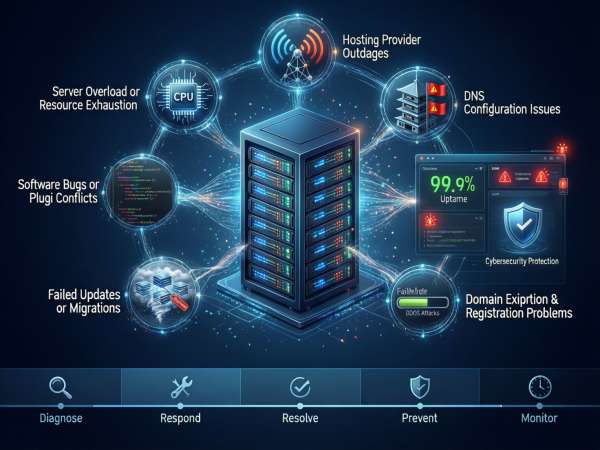
What Is Website Downtime?
Website downtime refers to any period during which a website is inaccessible or fails to load correctly for visitors. This can range from complete unavailability—where users see an error like “502 Bad Gateway” or “Site Not Found”—to partial outages, such as slow loading, broken pages, or non-functional features.
Downtime is typically measured in terms of uptime percentage, with industry standards expecting at least 99.9% availability annually (equivalent to roughly 8.76 hours of downtime per year). Even brief interruptions can impact user trust, conversion rates, and search engine rankings, as Google considers site reliability a key signal for quality.
Common causes include server failures, resource exhaustion, misconfigured DNS settings, software conflicts, security breaches, or expired domain registrations. For instance, a shared hosting environment may experience instability if neighboring sites consume excessive CPU or memory—highlighting why understanding the differences between shared hosting and VPS is critical for performance-sensitive projects.
Proactive monitoring, robust infrastructure, and proper configuration significantly reduce unplanned outages. Reliable hosting isn’t just about storage—it’s about consistent accessibility, rapid response to anomalies, and architectural resilience. As explored in our guide on how to choose the best hosting, selecting a solution aligned with your traffic, technical needs, and growth trajectory is foundational to minimizing downtime risk.
In essence, website downtime isn’t merely a technical glitch—it’s a business continuity concern that affects credibility, revenue, and digital presence. Addressing it requires both preventive planning and responsive support infrastructure.
Top 7 Causes of Website Downtime
Website downtime can stem from multiple technical and operational sources. Understanding these root causes is essential for maintaining reliability and minimizing disruptions.
1. Server Overload or Resource Exhaustion
When traffic exceeds available CPU, RAM, or I/O capacity—common in shared hosting environments—the server may become unresponsive. Choosing a scalable solution like VPS or managed hosting helps mitigate this risk.
2. Hosting Provider Outages
Infrastructure failures, maintenance errors, or power issues at the data center level can cause widespread downtime. Reputable providers maintain redundant systems and high uptime SLAs to reduce such incidents.
3. DNS Misconfigurations
Incorrect DNS records or propagation delays prevent visitors from resolving your domain to the correct IP address. Even with a functioning server, a misconfigured DNS renders your site inaccessible. Learn more about how domains and DNS work to avoid common pitfalls.
4. Plugin or Theme Conflicts
Especially on WordPress sites, incompatible or outdated plugins can trigger fatal errors. Regular updates and staging environment testing are critical for stability.
5. DDoS Attacks
Distributed Denial-of-Service attacks flood servers with malicious traffic, overwhelming resources. Robust hosting includes mitigation layers like firewalls and rate limiting.
6. Faulty Updates or Migrations
Improperly executed software updates, CMS upgrades, or site migrations can break core functionality. Always back up your site before major changes—see our guide on safe migration practices.
7. Domain Expiration
Letting your domain registration lapse—even with active hosting—immediately disconnects your site from its web address. Enable auto-renewal to prevent accidental expiration.
1. Server Overload or Resource Exhaustion
Server overload occurs when a web server’s available resources—such as CPU, memory (RAM), disk I/O, or network bandwidth—are fully consumed, preventing it from responding to new requests. This is one of the most frequent technical causes of website downtime, especially on entry-level hosting plans.
In shared hosting environments, multiple websites share the same physical server. If one site experiences a traffic spike or runs inefficient code (e.g., unoptimized plugins, poorly written scripts, or large database queries), it can monopolize system resources, causing slowdowns or complete failure for all sites on that server. This phenomenon is often referred to as the “noisy neighbor” problem.
Resource exhaustion may also stem from misconfigured applications, memory leaks, or background processes that run unchecked. For example, a WordPress site with dozens of active plugins and no caching mechanism can generate excessive PHP processes, rapidly depleting allocated memory limits. Similarly, high-traffic media files served without a content delivery network (CDN) can saturate disk I/O and bandwidth.
Signs of server overload include slow page loading, 503 Service Unavailable errors, 504 Gateway Timeout messages, or intermittent site access. Monitoring tools can help detect abnormal resource usage before it leads to full downtime.
To prevent overload, align your hosting solution with your site’s actual demands. Static brochure sites may perform well on basic shared hosting, but dynamic platforms—especially e-commerce stores or membership sites—require more headroom. Virtual Private Servers (VPS) or managed hosting provide dedicated resources, isolating your environment from external interference and offering greater control over performance tuning.
Beyond infrastructure, optimization plays a critical role: implementing caching layers, optimizing databases, limiting plugin use, and offloading static assets to a CDN significantly reduce server load. Regular performance audits ensure your configuration remains efficient as traffic and content grow.
Ultimately, server stability isn’t just about raw power—it’s about balance between demand, architecture, and proactive maintenance. Understanding your resource thresholds and planning for scalability are essential steps in maintaining consistent website availability.
2. Hosting Provider Outages
Hosting provider outages occur when the infrastructure managed by a web hosting company becomes temporarily unavailable due to hardware failure, network issues, power disruptions, or maintenance errors. Unlike problems originating from a website’s code or configuration, these outages affect all sites hosted on the impacted server or data center segment.
Even reputable providers can experience unplanned downtime, though the frequency and duration vary significantly based on their infrastructure quality, redundancy measures, and operational protocols. Common causes include failed storage arrays, router malfunctions, distributed denial-of-service (DDoS) attacks overwhelming network capacity, or human error during system updates.
Data centers with robust architecture implement multiple layers of redundancy—such as backup power generators, uninterruptible power supplies (UPS), clustered storage systems, and multi-homed network connections—to minimize single points of failure. Providers that operate in Tier-3 or Tier-4 facilities typically offer higher resilience against physical and environmental risks.
However, budget hosting services may cut corners by using oversubscribed servers, minimal monitoring, or non-redundant setups, increasing vulnerability to outages. In such cases, even minor incidents can cascade into extended downtime.
Transparency is another critical factor. Reliable hosting companies provide real-time status pages, proactive incident communication, and post-mortem reports detailing root causes and remediation steps. This level of accountability reflects operational maturity and commitment to service continuity.
While no provider can guarantee 100% uptime, industry standards consider 99.9% (often called “three nines”) acceptable for most business applications. Mission-critical operations may require 99.99% (“four nines”) or higher, which typically involves geographically distributed failover systems and enterprise-grade SLAs.
To mitigate risk, evaluate a provider’s track record, infrastructure documentation, and support responsiveness before committing. Additionally, maintaining off-server backups and considering multi-region deployment strategies can reduce dependency on a single point of failure.
Ultimately, hosting provider outages underscore the importance of choosing a partner whose technical foundation aligns with your availability requirements—not just your current needs, but your future growth and reliability expectations.
3. DNS Configuration Issues
DNS (Domain Name System) configuration issues are a frequent yet often overlooked cause of website downtime. The DNS acts as the internet’s address book, translating human-readable domain names (like example.com) into IP addresses that servers understand. When this translation fails or is misconfigured, visitors cannot reach your site—even if the server itself is fully operational.
Common DNS-related problems include incorrect A or AAAA records pointing to the wrong IP address, missing or expired NS (nameserver) records, improperly set TTL (Time to Live) values causing prolonged propagation delays, or incomplete DNS zone files after migration. A single typo in a record can render a site inaccessible globally for hours, depending on caching behavior across ISPs.
Another frequent issue arises during hosting provider changes. If nameservers aren’t updated correctly at the domain registrar—or if old DNS records linger—the domain may resolve to a decommissioned server. Similarly, using third-party email services (like Google Workspace or Microsoft 365) without proper MX record configuration can disrupt both email and, in some cases, web functionality if integrated systems depend on domain validation.
DNS propagation delays further complicate troubleshooting. Changes can take anywhere from a few minutes to 48 hours to reflect worldwide due to recursive resolver caching. During this window, users in different regions may experience inconsistent access—some see the live site, others encounter errors—creating confusion about the actual source of the problem.
Security vulnerabilities also play a role. DNS hijacking or cache poisoning attacks can redirect traffic to malicious sites, effectively taking your legitimate site offline from the user’s perspective. Implementing DNSSEC (Domain Name System Security Extensions) adds a layer of cryptographic validation to prevent such tampering.
To avoid DNS-related outages, always verify records before and after any infrastructure change, use reputable DNS hosting with high availability, and maintain a documented baseline of your current configuration. Tools like dig, nslookup, or online DNS checkers can help diagnose resolution issues quickly.
While DNS operates behind the scenes, its reliability is foundational to web accessibility. Proper management isn’t optional—it’s essential for ensuring your site remains consistently reachable, regardless of backend performance.
4. Software Bugs or Plugin Conflicts
Software bugs and plugin conflicts are among the most common causes of unexpected website downtime, particularly on content management systems like WordPress. These issues typically arise when code from themes, plugins, or core updates interacts unpredictably, triggering PHP fatal errors, database deadlocks, or infinite loops that crash the site.
In WordPress environments—where thousands of third-party plugins coexist—compatibility is never guaranteed. A plugin developed for an older PHP version may fail on modern stacks, or two plugins might attempt to modify the same system function simultaneously, causing a conflict. Even minor updates can introduce regressions if not thoroughly tested. The result is often a white screen of death (WSOD), HTTP 500 errors, or partial functionality loss.
Custom-coded themes or poorly optimized scripts exacerbate the problem. Functions without proper error handling, unclosed database connections, or memory-intensive operations can exhaust server resources or break page rendering. Unlike infrastructure failures, these issues are usually site-specific and tied directly to application logic.
Diagnosing plugin-related downtime requires methodical troubleshooting: disabling all plugins and re-enabling them one by one, switching to a default theme, or reviewing PHP error logs for stack traces. Many hosting platforms provide staging environments precisely to isolate such issues before they affect live visitors.
Prevention hinges on disciplined maintenance. Only install plugins from trusted developers with regular updates and active support. Keep core software, themes, and extensions up to date—but always test changes in a non-production environment first. Limit the number of active plugins to essential functions; each additional component increases the attack surface and failure risk.
For developers, implementing coding standards, input validation, and exception handling reduces the likelihood of runtime crashes. On the operational side, enabling debug mode during development (and disabling it in production) helps catch warnings before they escalate.
Ultimately, software stability is a shared responsibility between code quality and environment management. While no system is entirely immune to bugs, a proactive approach to testing, updating, and simplifying your tech stack significantly lowers the chance of avoidable outages.
5. Distributed Denial-of-Service (DDoS) Attacks
A Distributed Denial-of-Service (DDoS) attack aims to overwhelm a website or server by flooding it with an excessive volume of traffic from multiple compromised devices, often forming a botnet. Unlike regular traffic spikes, DDoS attacks are malicious, coordinated, and designed to exhaust bandwidth, CPU, or memory resources—rendering the target site inaccessible to legitimate users.
These attacks come in several forms. Volumetric attacks saturate network capacity with massive data packets. Protocol attacks exploit weaknesses in network layers (e.g., SYN floods targeting TCP handshakes). Application-layer attacks (Layer 7) mimic real user behavior—such as repeatedly requesting login pages or search functions—to drain server-side processing power. The latter are particularly insidious because they’re harder to distinguish from genuine traffic.
Websites without adequate protection can go offline within minutes of an attack’s onset. Even brief outages damage user trust, disrupt transactions, and may trigger search engine penalties for poor availability. E-commerce platforms, financial services, and media sites are frequent targets due to their high visibility and business impact.
Effective mitigation requires a multi-layered defense strategy. Basic measures include rate limiting, IP blacklisting, and Web Application Firewalls (WAFs) that filter anomalous requests. However, large-scale attacks often exceed the capacity of standard hosting infrastructure, necessitating cloud-based DDoS protection services that absorb and scrub traffic before it reaches the origin server.
Reputable hosting providers implement proactive monitoring, automatic anomaly detection, and integration with global scrubbing networks to neutralize threats in real time. Some also offer always-on protection or on-demand mitigation for sudden surges. Geographic distribution of infrastructure further enhances resilience by dispersing attack vectors across multiple data centers.
While no system is entirely immune, preparedness drastically reduces risk. Regular security audits, keeping software updated, and avoiding public exposure of server IPs all contribute to a stronger posture. Additionally, having an incident response plan—including communication protocols and backup access methods—ensures faster recovery if an attack occurs.
In today’s threat landscape, DDoS resilience is not optional—it’s a fundamental requirement for any serious online presence. Protection must be built into the hosting architecture from the ground up, not added as an afterthought.
6. Failed Updates or Migrations
Failed updates or migrations are a leading cause of avoidable website downtime, often resulting from inadequate planning, testing, or execution during critical maintenance windows. Whether upgrading a content management system, applying security patches, or moving a site to a new server, these operations carry inherent risk if not handled methodically.
During CMS or plugin updates, incompatibilities between new code and existing themes or extensions can trigger fatal PHP errors, broken layouts, or database schema mismatches. Similarly, server-level updates—such as PHP version changes or module upgrades—may introduce syntax deprecations that halt script execution. Without a rollback plan, such failures leave the site partially or fully offline.
Site migrations pose even greater complexity. Transferring files, databases, and configurations between environments involves precise coordination. Common pitfalls include incorrect file permissions, missing .htaccess rules, hardcoded URLs pointing to the old domain, or incomplete database imports. DNS propagation delays can further complicate post-migration validation, creating a false impression of failure when the issue is merely caching.
The consequences extend beyond accessibility: data loss, SEO ranking drops due to broken links, and user experience degradation can persist long after the site returns online. Search engines may temporarily deindex pages if they encounter repeated 5xx errors during the transition.
To prevent disruption, always perform updates and migrations in a staging environment first. This isolated replica allows full validation of functionality, performance, and compatibility without affecting live traffic. Maintain complete backups of both files and databases immediately before any change, and verify restoration procedures in advance.
Automated deployment scripts and version control systems (like Git) add consistency and reduce human error. For large-scale moves, consider a phased approach—redirecting subsets of traffic gradually while monitoring logs and uptime metrics in real time.
Ultimately, successful updates and migrations rely on discipline, not just technical skill. Treating every change as a potential point of failure—and preparing accordingly—is essential for maintaining uninterrupted service and preserving digital credibility.
7. Domain Expiration or Registration Problems
Domain expiration is a preventable yet surprisingly common cause of complete website downtime. When a domain registration lapses—often due to missed renewal reminders, outdated contact information, or payment failures—the domain enters a grace period before being released for public re-registration. During this time, DNS resolution stops working, making the website and associated email services unreachable, even if hosting remains active.
Registration issues extend beyond expiration. Incomplete WHOIS verification, registrar lock misconfigurations, or disputes over ownership can also suspend a domain’s functionality. Some registrars disable DNS propagation immediately upon non-payment, while others allow a 30-day redemption window—but access is never guaranteed during this phase.
Unlike server-side outages, domain-related failures affect all services tied to the domain name globally and simultaneously. Visitors typically encounter “site not found” or “server IP address could not be found” errors, with no indication that the underlying hosting is operational.
To avoid disruption, enable auto-renewal through your registrar and ensure billing details are current. Monitor expiration dates proactively—many administrators manage dozens of domains and overlook renewal notices in crowded inboxes. Additionally, keep administrative email addresses updated, as critical verification or suspension alerts are sent there.
How to Diagnose Website Downtime Quickly
Rapid diagnosis minimizes downtime impact. Begin by verifying whether the issue is local or global: use multiple devices or online tools like DownForEveryoneOrJustMe.com. If the site is down for everyone, proceed systematically.
Check HTTP status codes: a 5xx error points to server problems; a 404 may indicate file or permalink issues; no response at all suggests DNS or network failure. Use command-line tools like ping, traceroute, or nslookup to test connectivity and DNS resolution. If the domain doesn’t resolve to the correct IP, investigate registrar status and DNS records.
Review recent changes—updates, deployments, or configuration edits—that might have triggered the outage. Access server error logs (e.g., Apache or Nginx logs) for detailed failure clues. For managed platforms, control panel alerts or uptime monitors often provide immediate context.
Finally, confirm domain registration status via WHOIS lookup. An expired or suspended domain requires immediate renewal or support intervention. By following this structured approach, you isolate the root cause faster and apply the right fix—without guesswork.
Effective Solutions for Each Cause
Addressing website downtime requires targeted remedies aligned with each root cause. A one-size-fits-all approach is ineffective; instead, solutions must reflect the technical nature of the failure.
For server overload, scale resources appropriately—migrate from shared hosting to a VPS or dedicated environment when traffic or application demands exceed baseline capacity. Implement caching (object, page, or CDN-based), optimize databases, and audit resource-heavy scripts to reduce load.
To counter hosting provider outages, choose providers with redundant infrastructure, real-time monitoring, and transparent status reporting. Consider multi-region failover setups for mission-critical applications, and maintain off-site backups to enable rapid recovery if extended downtime occurs.
DNS issues are best mitigated through careful record management. Always validate DNS changes before deployment, use low TTL values during transitions, and host DNS with a reliable, high-availability provider. Enable DNSSEC to guard against hijacking and ensure consistent global propagation.
For software bugs or plugin conflicts, adopt a disciplined update workflow: test all changes in a staging environment, limit plugins to essential functions, and keep core software updated. Use debugging tools and error logs to identify incompatibilities quickly, and maintain a clean rollback path.
Defending against DDoS attacks requires layered protection: deploy a Web Application Firewall (WAF), enable rate limiting, and integrate with cloud-based DDoS mitigation services that absorb malicious traffic before it reaches your origin server. Avoid exposing server IPs directly in public records or email headers.
When handling failed updates or migrations, always back up your site beforehand and perform dry runs in isolated environments. Use version control for code changes and automate deployments where possible. After migration, verify DNS settings, file permissions, database connections, and internal links before going live.
Finally, prevent domain expiration by enabling auto-renewal, maintaining accurate WHOIS contact details, and setting calendar reminders well ahead of renewal dates. Monitor domain status regularly—especially for portfolios with multiple domains.
Each solution emphasizes prevention, monitoring, and rapid response. By aligning infrastructure choices with operational discipline, businesses can dramatically reduce both the frequency and impact of unplanned downtime.
Optimizing Server Resources and Choosing Reliable Hosting
Ensuring consistent website availability begins with aligning your hosting infrastructure to your actual technical demands. Under-provisioned resources lead to slowdowns or crashes during traffic surges, while over-provisioning wastes budget without performance gains. The key is strategic resource optimization paired with a dependable hosting foundation.
Start by auditing your current usage: monitor CPU, memory, disk I/O, and bandwidth consumption over time. Tools like server dashboards, SSH-based utilities (e.g., htop, iostat), or application performance monitors reveal bottlenecks. For content-heavy sites, slow disk reads often stem from using traditional HDDs instead of SSD or NVMe storage—upgrading storage media alone can yield significant responsiveness improvements.
Beyond hardware, software-level tuning plays a critical role. Implement caching mechanisms (OPcache for PHP, Redis for object caching, or full-page caching via plugins or reverse proxies) to reduce repetitive processing. Optimize databases by cleaning unused tables, indexing frequently queried columns, and scheduling regular maintenance. Limit background processes and disable unused modules or services that consume idle resources.
Equally important is selecting a hosting provider whose architecture supports resilience. Reliable hosting includes features like isolated environments (to prevent “noisy neighbor” interference), automatic failover, real-time intrusion detection, and proactive monitoring with alerting. Look for providers that offer granular resource allocation, scalable plans, and transparent uptime reporting—not just marketing claims.
Shared hosting may suffice for low-traffic informational sites, but dynamic applications—especially e-commerce platforms, membership portals, or high-traffic blogs—benefit from VPS, cloud, or managed dedicated solutions. These options provide root access, customizable stacks, and predictable performance unaffected by neighboring accounts.
Finally, ensure your hosting stack uses modern, supported software versions (PHP 8.x+, HTTP/2 or HTTP/3, TLS 1.3) and receives timely security patches. Outdated components not only hinder performance but introduce vulnerabilities that can lead to service disruption.
Optimization isn’t a one-time task—it’s an ongoing practice of measurement, adjustment, and alignment between workload and infrastructure. When done correctly, it minimizes downtime risk while maximizing efficiency, speed, and user experience.
Monitoring Uptime with Proactive Alerts
Proactive uptime monitoring is a cornerstone of reliable website operations. Rather than discovering downtime through user complaints or search engine penalties, real-time monitoring systems detect issues the moment they occur—often before visitors are affected.
Effective monitoring goes beyond simple “ping” checks. Advanced tools simulate real user interactions by loading full pages, validating SSL certificates, checking HTTP status codes, and measuring response times from multiple global locations. This approach identifies not just total outages but also partial failures—such as slow database queries, broken APIs, or regional connectivity problems—that degrade experience without triggering a complete site crash.
Alerting mechanisms must be timely and actionable. Notifications via email, SMS, or integration with platforms like Slack or Microsoft Teams ensure rapid awareness. Critical alerts should include diagnostic context: error type, affected endpoint, duration, and geographic scope. This reduces troubleshooting time and enables faster resolution.
Monitoring frequency also matters. High-traffic or transactional sites benefit from checks every 30–60 seconds, while informational sites may use 5-minute intervals. However, excessive polling can generate noise; balance sensitivity with practicality based on your site’s business impact.
Beyond availability, performance metrics are equally vital. Tracking load times, Time to First Byte (TTFB), and resource usage trends helps identify degradation before it leads to failure. Sudden spikes in response latency often precede server overload or database deadlocks—early warnings that allow preemptive scaling or optimization.
For self-managed servers, tools like Nagios, Zabbix, or Prometheus offer deep infrastructure visibility, including CPU, memory, disk, and network health. Managed hosting users should verify whether their provider includes built-in monitoring with historical data and alert customization.
Crucially, monitoring data should feed into continuous improvement. Review outage reports monthly to spot recurring patterns—such as weekly traffic surges overwhelming resources or plugin updates consistently causing errors. Use these insights to refine architecture, update workflows, or adjust alert thresholds.
In essence, uptime monitoring isn’t just about detecting failure—it’s about building resilience through visibility, speed, and informed decision-making. When implemented correctly, it transforms reactive firefighting into proactive service assurance.
Securing Your Site Against Cyber Threats
Cyber threats remain a leading cause of website downtime, data breaches, and reputational damage. From automated bot attacks to targeted exploits, malicious actors continuously probe for vulnerabilities in code, configuration, and user behavior. A robust security posture is not optional—it’s essential for maintaining availability, integrity, and trust.
Begin with foundational hardening: keep all software—CMS core, themes, plugins, server OS, and control panels—updated to the latest stable versions. Most attacks exploit known vulnerabilities for which patches already exist. Disable unused services, remove default accounts, and enforce strong file permissions to limit attack surfaces.
Implement a Web Application Firewall (WAF) to filter malicious traffic before it reaches your site. A WAF blocks common threats like SQL injection, cross-site scripting (XSS), and file inclusion attacks by analyzing HTTP requests against rule sets. For high-risk environments, consider cloud-based WAFs with behavioral analysis and zero-day protection.
Authentication security is equally critical. Enforce strong, unique passwords and multi-factor authentication (MFA) for all administrative access. Limit login attempts to deter brute-force attacks, and restrict admin panel access by IP where feasible. Avoid using “admin” as a username—a common target for credential stuffing.
Regular backups are your last line of defense. Store encrypted, off-server backups with version history, and test restoration procedures periodically. In the event of ransomware or defacement, clean backups enable rapid recovery without paying attackers or losing data.
Additionally, secure your hosting environment at the network level. Use SSH key authentication instead of passwords, disable unused ports, and segment services where possible. Enable intrusion detection systems (IDS) to monitor for suspicious activity, such as unexpected file changes or unusual outbound traffic.
Finally, educate users and developers on security best practices. Phishing remains a top entry point—train teams to recognize suspicious emails and links. For custom code, follow secure development guidelines: validate inputs, escape outputs, and use parameterized queries.
Security is not a one-time setup but an ongoing discipline. By combining proactive defense, continuous monitoring, and rapid response capabilities, you significantly reduce the risk of cyber-induced downtime and protect both your site and your visitors.
Testing Updates in a Staging Environment
Deploying updates directly to a live website is a high-risk practice that frequently leads to unexpected downtime, broken functionality, or data corruption. A staging environment—a near-identical replica of the production site—serves as a safe sandbox for validating changes before they affect real users.
A properly configured staging environment mirrors the live server’s operating system, PHP version, database structure, installed plugins, and active theme. This fidelity ensures that test results accurately reflect how updates will behave in production. Even minor discrepancies—such as different MySQL modes or missing PHP extensions—can mask critical compatibility issues.
All types of changes benefit from staging validation: CMS core upgrades, plugin or theme updates, custom code deployments, configuration tweaks, and even content migrations. For example, a WordPress plugin update might appear harmless but could conflict with a caching layer or break checkout logic on an e-commerce site. Only thorough testing reveals these hidden interactions.
Effective staging workflows include functional checks (e.g., form submissions, user logins, payment flows), performance benchmarks (page load times, memory usage), and regression testing to confirm existing features remain intact. Automated testing tools can accelerate this process, but manual review by stakeholders remains essential for user experience validation.
Security also improves with staging. Malicious code injected via compromised plugins or themes can be identified in isolation without exposing the live site. Additionally, failed updates can be debugged safely, with full access to error logs and developer tools, without triggering 500 errors for visitors.
Once testing confirms stability, changes should be deployed during low-traffic windows using version-controlled scripts or deployment pipelines to ensure consistency. Always follow deployment with post-launch monitoring to catch edge cases that staging couldn’t replicate—such as third-party API rate limits or CDN caching quirks.
For businesses without dedicated DevOps resources, many managed hosting providers offer one-click staging environments integrated into control panels. This accessibility removes technical barriers and encourages consistent use.
In essence, staging isn’t a luxury—it’s a fundamental risk mitigation strategy. By catching failures before they reach production, organizations preserve uptime, maintain user trust, and uphold professional reliability in every digital interaction.
Maintaining Domain and DNS Health
Domain and DNS integrity are foundational to website availability. Even with a perfectly functioning server, mismanagement of domain registration or DNS records can render a site completely unreachable. Proactive maintenance of these components is essential for uninterrupted online presence.
Start with domain registration hygiene. Ensure auto-renewal is enabled and billing information is up to date. Monitor expiration dates—at least 30 days in advance—and verify that the administrative email address in WHOIS records is active and monitored. Many outages occur simply because renewal notices went unread or payment methods expired.
Enable domain privacy if offered, but never at the cost of losing access to critical verification emails. Some registrars suspend domains pending WHOIS validation; delays in responding can lead to temporary resolution failures. Additionally, keep your domain locked to prevent unauthorized transfers, which can be exploited in targeted attacks.
For DNS, maintain a clean, well-documented zone file. Avoid redundant or obsolete records that can cause conflicts during troubleshooting. Use descriptive naming conventions and version control for DNS changes, especially in team environments. When modifying records—such as adding a new subdomain or switching mail providers—validate syntax and test resolution using tools like dig or online DNS checkers before finalizing.
Set appropriate TTL (Time to Live) values based on your operational needs. Use lower TTLs (e.g., 300 seconds) ahead of planned changes to speed up propagation, then increase them afterward to reduce query load and improve caching efficiency. Never make DNS changes during high-traffic periods without a rollback plan.
Host your DNS with a provider that offers high availability, anycast routing, and DDoS protection. Free or basic registrar DNS services may lack redundancy, leading to outages during network incidents. Enterprise-grade DNS providers distribute queries across global nodes, ensuring resilience even if one location fails.
Finally, implement DNSSEC (Domain Name System Security Extensions) to protect against cache poisoning and man-in-the-middle attacks. While not a cure-all, DNSSEC adds cryptographic validation that ensures users reach the authentic IP address associated with your domain.
Regular audits—quarterly or before major launches—help catch drift, misconfigurations, or security gaps. Treat your domain and DNS infrastructure with the same rigor as your application code: they are not static assets, but dynamic, mission-critical systems requiring ongoing care.
Preventive Measures to Minimize Future Downtime
Preventing website downtime requires a proactive, layered strategy that addresses infrastructure, software, security, and operational practices. Reactive fixes alone cannot ensure reliability—consistency stems from disciplined prevention.
Begin with infrastructure resilience. Choose a hosting environment aligned with your traffic patterns and application complexity. Shared hosting may suffice for static sites, but dynamic or high-traffic platforms demand scalable solutions like VPS, cloud, or managed dedicated servers with isolated resources. Ensure your provider implements redundant power, network, and storage systems to withstand hardware failures.
Maintain rigorous update hygiene. Apply CMS, plugin, theme, and server software updates promptly—but only after testing in a staging environment. Outdated software is the primary entry point for exploits that lead to defacement, data loss, or service disruption.
Implement comprehensive monitoring. Use uptime checks from multiple global locations, paired with performance metrics (TTFB, load time, SSL expiry) and real-time alerts. Early detection of anomalies—such as rising CPU usage or slow database queries—allows intervention before full failure occurs.
Secure your digital assets. Enforce strong authentication, enable Web Application Firewalls (WAF), restrict admin access, and conduct regular security audits. Many outages originate from compromised accounts or injected malware that overloads server processes.
Back up consistently and verify recoverability. Maintain automated, encrypted, off-server backups with version history. Schedule periodic restoration tests to confirm data integrity—backups are only valuable if they work when needed.
Manage domain and DNS health proactively. Enable auto-renewal, monitor expiration dates, and host DNS with a high-availability provider. Use DNSSEC and keep zone records clean and documented to avoid resolution failures during transitions.
Optimize application performance. Implement caching, compress assets, defer non-critical scripts, and use a CDN to reduce origin server load. Efficient code and resource usage lower the risk of overload during traffic spikes.
Finally, establish an incident response plan. Define roles, communication channels, and recovery steps for common scenarios—server crash, DDoS attack, domain suspension. Conduct tabletop drills to refine response times.
Website reliability is not accidental; it’s engineered through foresight, discipline, and continuous improvement. By embedding these preventive measures into your operational workflow, you transform uptime from a hope into a standard.
When to Contact Your Hosting Support Team
Knowing when to escalate an issue to your hosting support team can mean the difference between minutes and hours of downtime. While many website problems originate from application-level code or configuration, others stem from infrastructure layers only your provider can access or resolve.
Contact support immediately if you suspect a server-wide outage—indicated by complete inaccessibility across all sites on your account, inability to reach the server via SSH or SFTP, or repeated 502/503/504 errors without recent changes on your end. These often point to underlying hardware failure, network partitioning, or resource exhaustion at the host level.
Similarly, reach out if DNS propagation appears stalled beyond 48 hours despite correct records, or if your domain resolves but the server refuses connections—this may signal IP misconfiguration, firewall blocks, or routing issues within the data center.
Security incidents also warrant urgent support involvement. If you observe unusual outbound traffic, unexpected processes running at high CPU, or signs of unauthorized access (e.g., unknown admin accounts, injected files), your provider can investigate server logs, isolate compromised services, and assist with forensic analysis.
Performance degradation without clear cause—such as sudden, sustained slowness across all pages despite optimized code—may indicate noisy neighbors in shared environments or I/O bottlene, especially on non-SSD storage. Hosting teams can assess resource allocation and recommend upgrades or migrations.
During migrations or complex deployments, consult support if you encounter persistent database connection failures, mail delivery issues tied to server settings, or SSL/TLS handshake errors that persist after certificate installation. These often involve server-level configurations like PHP-FPM pools, Exim/Postfix settings, or Apache/Nginx directives.
Before contacting support, gather diagnostic details: error messages, timestamps, affected URLs, screenshots, and results from basic tests (e.g., ping, curl -I, or uptime checker outputs). This accelerates troubleshooting and demonstrates due diligence.
Remember: quality hosting providers offer more than ticket responses—they provide expertise. Leveraging their knowledge early prevents minor anomalies from escalating into prolonged outages. A responsive, technically skilled support team is not just a service feature—it’s a critical component of your site’s resilience strategy.
ontent and absorbing malicious requests. However, it won’t help if your origin server fails completely or if dynamic content relies on live database access.
Frequently Asked Questions (FAQ)
How can I check if my website is down for everyone or just me?
Use online tools like DownForEveryoneOrJustMe, Pingdom, or UptimeRobot to verify whether your site is inaccessible globally or only from your location. These tools help distinguish between local connectivity issues and actual server downtime.
What should I do immediately when my website goes down?
First, confirm the outage using an external monitoring tool. Then, check your hosting provider’s status page for known incidents. If the issue appears to be on your end, review recent changes (updates, plugins, DNS edits) and contact your hosting support with relevant details like error logs or timestamps.
Can a plugin really take my WordPress site offline?
Yes. A faulty or incompatible plugin can cause fatal PHP errors that render your site inaccessible. To prevent this, always test new plugins in a staging environment and keep them updated. If your site crashes after installing a plugin, access your site via FTP or cPanel to disable it manually.
How often should I monitor my website uptime?
For business-critical websites, real-time monitoring with instant alerts (via SMS or email) is recommended. Services like UptimeRobot or Jetpack Monitor offer free plans that check your site every 5 minutes, helping you detect and resolve downtime quickly.
Does domain expiration automatically shut down my website?
Yes. Once your domain expires, visitors can’t resolve your domain name to your server’s IP address, effectively making your site unreachable—even if your hosting is active. Most registrars provide a grace period, but it’s best to enable auto-renewal to avoid accidental expiration.
Can DDoS attacks be prevented completely?
While no solution guarantees 100% protection, using a CDN with DDoS mitigation (like Cloudflare or Sucuri) significantly reduces risk. These services absorb malicious traffic before it reaches your server, keeping your site online during most attack scenarios.
Why does my site go down after a WordPress update?
Updates can introduce compatibility issues between core files, themes, or plugins—especially if you’re using outdated or custom code. Always back up your site and test updates in a staging environment before applying them to your live site.
Is shared hosting more prone to downtime?
Shared hosting can be more vulnerable to performance issues because resources are shared among many users. If one site consumes excessive CPU or memory, it can affect others on the same server. Upgrading to managed WordPress hosting or a VPS often improves stability and uptime.
How long does DNS propagation take after making changes?
DNS changes typically propagate within 24–48 hours, though it can sometimes happen faster. During this window, some users may see your old site while others see the new configuration—this isn’t true downtime but can appear as inconsistent availability.
Should I switch hosting providers if my site keeps going down?
If downtime occurs frequently and your current provider offers poor support, slow response times, or lacks redundancy, switching to a more reliable host—especially one with SLA-backed uptime guarantees—can be a smart move for business continuity.

