What Is a Subdomain and When Should You Use It?
Print- 0
What Is a Subdomain and When Should You Use It?
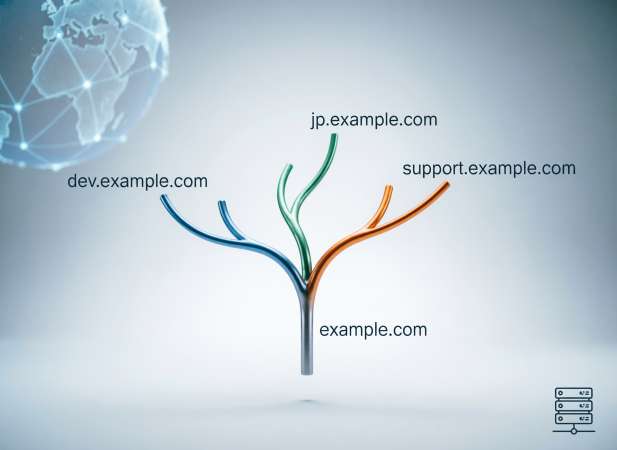
Understanding subdomains is essential for anyone managing a website—from entrepreneurs launching their first site to developers architecting complex digital ecosystems. A subdomain acts as a dedicated segment under your primary domain (like support.yourbrand.com or es.yourbrand.com), creating functional or thematic separation without requiring a new domain registration. Yet this flexibility carries weight: choosing a subdomain over a subdirectory impacts SEO strategy, user navigation, security scope, and long-term maintenance. Many implement subdomains reactively, only to face fragmented analytics, diluted authority, or confusing visitor pathways later. In this guide, Madar Host’s infrastructure team delivers clear, actionable insights to help you evaluate *when* a subdomain genuinely serves your goals—and when alternatives may be wiser. We’ll clarify real-world applications, address common misconceptions, and equip you with a practical decision framework to structure your online presence intentionally and effectively.
What Exactly Is a Subdomain? Beyond the Basics
A subdomain is a logical division of a primary domain name, functioning as an independent DNS (Domain Name System) record that routes traffic to a distinct section of your web infrastructure. Technically, it sits to the left of your root domain—such as shop.example.com, where “shop” is the subdomain and “example.com” is the registered domain. Unlike subdirectories (e.g., example.com/shop), which exist within the same server path and share hosting resources under one site configuration, subdomains are treated by DNS servers as separate entities.
This distinction matters because each subdomain can point to a different IP address, server, or even hosting environment entirely. For instance, your main website might reside on a shared hosting plan at www.yourdomain.com, while your internal CRM application runs on a VPS at app.yourdomain.com. From a network perspective, both resolve independently through DNS A or CNAME records, allowing granular control over routing, security policies, and performance optimization.
Subdomains also carry implications for cookies, SSL certificates, and content isolation. Browser security models treat blog.yourdomain.com and store.yourdomain.com as separate origins unless explicitly configured otherwise—meaning session data isn’t automatically shared, and wildcard SSL certificates may be required for seamless HTTPS coverage across all branches. Furthermore, search engines historically evaluated subdomains as semi-independent sites, which affects how link equity and topical authority are distributed compared to subfolders.
From a systems architecture standpoint, subdomains enable modular scalability: you can deploy a WordPress blog on one subdomain, a Node.js API on another, and a static documentation portal on a third—all under a unified brand identity but with tailored server stacks, resource allocation, and update cycles. This architectural flexibility is why developers, SaaS platforms, and enterprise teams leverage subdomains not just for organization, but for operational precision.
How Subdomains Function Within DNS Architecture
Within DNS infrastructure, a subdomain exists as a distinct node in the domain namespace hierarchy. When you provision app.yourdomain.com, your DNS provider creates a resource record—typically an A record (direct IP mapping), CNAME (alias to another domain), or AAAA (IPv6 address)—within the parent domain’s zone file. During resolution, recursive DNS servers traverse the full chain: querying root servers → TLD (.com) nameservers → your domain’s authoritative nameservers → finally retrieving the specific record for the subdomain node.
Advanced delegation elevates this further: NS (nameserver) records can assign administrative control of a subdomain to an entirely separate DNS infrastructure. For example, eu.yourdomain.com might delegate to European-hosted nameservers for latency optimization, while dev.yourdomain.com delegates to a team-managed DNS service. This isolation enables independent TTL configurations, DNSSEC signing policies, and record management without touching the primary domain zone.
Unlike subdirectories—which rely solely on web server routing (e.g., Apache virtual hosts or Nginx location blocks)—subdomains operate at the network layer. This architectural separation directly impacts SSL/TLS certificate scope (requiring wildcard or multi-domain certs), geolocation routing decisions, CDN origin assignments, and security boundary definitions. Precise DNS configuration ensures traffic flows predictably across distributed environments while maintaining operational autonomy for specialized endpoints.
Visual Breakdown: Subdomain vs. Root Domain in a URL
Examining a URL reveals its hierarchical structure at a glance. Take https://shop.yourdomain.com/products/item as an example: the protocol (https://) initiates the request, followed by the subdomain (shop), the second-level domain (yourdomain), the top-level domain (.com), and finally the path (/products/item). The subdomain precedes the root domain and is separated by a dot—not a slash—indicating DNS-level segmentation rather than directory nesting.
Contrast this with a subdirectory structure: https://yourdomain.com/shop/products/item. Here, shop exists as a folder within the same document root, routed entirely by the web server's configuration. No separate DNS record is required, and the entire path inherits the same SSL context, cookie domain, and server resources as the parent site.
This visual distinction signals deeper architectural differences. Subdomains enable independent server assignments, distinct SSL certificates (or wildcard coverage), and isolated application environments. Subdirectories remain bound to the primary site's hosting configuration, sharing session data, analytics tracking, and security policies. Recognizing these patterns helps you anticipate implications for performance tuning, content delivery network (CDN) integration, cross-origin resource sharing (CORS) rules, and search engine indexing behavior when planning your site's information architecture.
Strategic Use Cases Where Subdomains Deliver Real Value
Subdomains are not merely organizational labels—they serve as architectural tools that solve specific operational challenges across diverse hosting scenarios. When deployed intentionally, they enable isolation, scalability, and targeted delivery without the overhead of registering additional domains. The strategic value emerges in environments where separation of concerns matters: whether isolating development workflows from production traffic, segmenting user experiences by region or language, or distributing resource-intensive applications across dedicated server resources.
From a systems perspective, subdomains provide clean boundaries for security policies, SSL certificate management, analytics tracking, and content delivery network (CDN) configurations. They allow teams to delegate administrative control, implement distinct caching strategies, or route traffic based on geographic proximity—all while maintaining brand consistency under a unified domain identity. For growing businesses, this modularity supports phased expansion: launching a support portal, testing a new feature branch, or rolling out a regional campaign without disrupting the core website's stability or SEO equity.
Understanding where subdomains excel—and where alternatives like subdirectories or separate domains may be more appropriate—requires evaluating factors such as technical complexity, maintenance overhead, search engine visibility goals, and user navigation patterns. The following scenarios illustrate contexts where subdomains consistently deliver measurable advantages in performance, security, and long-term manageability.
Isolating Development and Staging Environments Safely
In professional web development workflows, subdomains provide critical isolation between production, staging, and development environments. By assigning distinct subdomains—such as dev.yourdomain.com, staging.yourdomain.com, and test.yourdomain.com—teams create separate deployment targets that mirror production infrastructure without exposing unfinished code or untested features to public visitors.
This architectural separation prevents accidental data corruption, limits security exposure during vulnerability testing, and allows parallel development cycles. Each environment can run on dedicated server resources with tailored configurations: development instances may enable verbose error logging and debugging tools disabled in production, while staging environments replicate live database schemas and caching layers for accurate pre-deployment validation.
DNS-level isolation ensures that API endpoints, database connections, and third-party service integrations remain environment-specific. For example, payment gateway calls from staging.yourdomain.com can route to sandbox modes, while analytics tracking and email notifications are safely disabled to avoid contaminating production datasets. Access controls further reinforce security—HTTP authentication, IP whitelisting, or VPN requirements can be applied selectively to non-production subdomains without affecting the live site's availability.
From a deployment perspective, this structure streamlines continuous integration pipelines. Developers push changes to the development subdomain for initial review, promote validated updates to staging for QA and stakeholder approval, then execute controlled releases to the production domain. Rollbacks become less risky, as previous environment states remain accessible for comparison or emergency restoration.
Properly configured, this subdomain strategy minimizes downtime, reduces human error during deployments, and maintains clear boundaries between experimental work and customer-facing services—essential for agencies managing multiple client projects or enterprises scaling complex applications.
Targeting Geographic Markets or Language Variations
Subdomains offer a scalable approach to internationalization and regional targeting, enabling businesses to serve localized content while maintaining a cohesive brand architecture. Geographic subdomains like uk.yourdomain.com, de.yourdomain.com, or jp.yourdomain.com signal clear regional intent to both users and search engines, facilitating country-specific SEO strategies and compliance with local data regulations.
From a technical standpoint, these subdomains can point to geographically distributed server clusters or CDN edge locations, reducing latency for regional visitors. Each subdomain can implement localized server configurations—currency formatters, timezone settings, regional payment gateways, and language-specific caching policies—without affecting the global site's core infrastructure.
Linguistic subdomains such as es.yourdomain.com (Spanish) or fr.yourdomain.com (French) allow content teams to manage translations independently while preserving consistent navigation patterns. Unlike URL parameters or session-based language switching, subdomains provide stable, indexable URLs that search engines can crawl and rank for region-specific keyword queries.
This structure also simplifies analytics segmentation. Traffic, conversion rates, and user behavior can be tracked per region without complex filtering, enabling data-driven decisions about market expansion or content optimization. Additionally, localized SSL certificates, legal disclaimers, and privacy policies can be implemented at the subdomain level to meet jurisdictional requirements.
While alternatives exist—such as subdirectories (yourdomain.com/fr/) or country-code TLDs (yourdomain.fr)—subdomains strike a balance between technical autonomy and brand unity, particularly for organizations scaling across multiple markets without the overhead of managing entirely separate domain registrations.
Hosting Specialized Microsites or Campaign Hubs
Subdomains provide an ideal foundation for temporary or semi-permanent microsites and campaign-specific hubs that require distinct branding, functionality, or technical requirements from the main website. Event landing pages (event.yourdomain.com), product launch portals (launch.yourdomain.com), or seasonal promotions (blackfriday.yourdomain.com) benefit from this architectural separation, allowing focused user experiences without cluttering the primary site's navigation or codebase.
Technically, each campaign subdomain can deploy a tailored tech stack—static site generators for speed, specialized JavaScript frameworks for interactivity, or lightweight CMS instances for content flexibility—while the main domain maintains its established infrastructure. This independence enables rapid deployment cycles: marketing teams can launch, iterate, and decommission campaign sites without coordinating complex merges into the core website repository or risking production stability.
From an analytics perspective, subdomain isolation simplifies performance tracking. Conversion metrics, traffic sources, and user engagement can be measured independently for each campaign, providing clear ROI attribution without filtering noise from the main site's broader activity. Similarly, SEO strategies can be optimized per subdomain—targeting niche keyword clusters, building dedicated backlink profiles, or implementing schema markup specific to the campaign's objectives.
Security boundaries also tighten: form submissions, API integrations, and third-party scripts operate within the subdomain's scope, limiting potential vulnerabilities from affecting the primary domain. Once a campaign concludes, the subdomain can be archived, redirected, or repurposed with minimal disruption. This modular approach scales efficiently for organizations running concurrent initiatives across departments, regions, or product lines.
Segmenting High-Traffic Applications (Webmail, Support Portals)
Subdomains are a proven method for isolating high-traffic or resource-intensive applications such as webmail interfaces (mail.yourdomain.com), customer support portals (help.yourdomain.com), or internal dashboards (admin.yourdomain.com). By assigning these services to dedicated subdomains, organizations prevent performance bottlenecks on their primary website and enable independent scaling based on usage patterns.
From an infrastructure standpoint, each subdomain can be routed to specialized server environments optimized for its workload—such as a lightweight containerized instance for a knowledge base or a secure, hardened VPS for email access. This separation allows system administrators to apply granular resource allocation, custom firewall rules, rate limiting, and SSL/TLS configurations without impacting the main site’s availability or security posture.
User experience also benefits significantly. Visitors accessing your marketing site won’t encounter latency caused by concurrent authentication requests or database queries from your ticketing system. Similarly, session management remains isolated: login states for your support portal don’t interfere with e-commerce checkout flows or content personalization on the root domain.
Operational efficiency improves as well. Monitoring, logging, and incident response can be scoped per subdomain, simplifying troubleshooting during traffic spikes or service disruptions. Backup schedules, software updates, and compliance audits (e.g., GDPR or PCI-DSS) can be applied contextually—ensuring sensitive application data is handled according to its specific regulatory requirements. This architectural clarity is especially valuable for businesses managing multiple SaaS tools, client portals, or employee-facing platforms under a single brand identity.
Critical Evaluation Points Before Implementation
Deploying subdomains introduces architectural decisions with lasting implications for performance, security, and search visibility. Before implementation, a thorough evaluation of your specific requirements ensures the chosen structure aligns with long-term operational goals rather than short-term convenience. Key considerations span technical overhead, SEO strategy, user experience, and maintenance complexity.
From a search engine optimization perspective, modern algorithms increasingly treat subdomains as distinct entities—potentially diluting domain authority that would otherwise consolidate under a unified root domain. While Google has clarified that subdomains can inherit ranking signals in many cases, competitive keyword landscapes often favor the concentrated link equity of subdirectories for content-heavy sites. Assess whether your use case genuinely requires isolation or if a well-structured folder hierarchy would suffice.
Operational overhead escalates with each additional subdomain: separate SSL certificate management (unless leveraging wildcard certificates), independent analytics properties, distinct caching configurations, and multiplied DNS records all demand ongoing administrative attention. Teams must weigh this complexity against the benefits of isolation—particularly for smaller organizations with limited DevOps resources.
User navigation and brand perception also factor in. Subdomains can create cognitive friction if visitors struggle to distinguish between blog.yourdomain.com and yourdomain.com/blog. Clear visual cues, consistent cross-linking, and intuitive information architecture become essential to prevent audience fragmentation. Additionally, cookie isolation between subdomains may disrupt seamless authentication flows unless explicitly configured for cross-subdomain sharing.
Finally, consider future scalability. Will this subdomain eventually warrant migration to a standalone domain? Will traffic patterns necessitate dedicated server resources or CDN configurations? Planning for growth prevents costly restructuring later. A deliberate evaluation against these criteria ensures subdomains serve as strategic assets rather than technical debt.
SEO Authority Distribution: What Modern Search Algorithms Prefer
Search engine treatment of subdomains has evolved significantly over the past decade. Historically, algorithms treated subdomains as entirely separate entities—meaning link equity, domain authority, and topical relevance accumulated independently for blog.yourdomain.com versus yourdomain.com. This fragmentation often disadvantaged subdomain-heavy architectures in competitive keyword spaces.
Modern search algorithms, particularly Google's, now recognize subdomains as potentially belonging to the same organizational entity when clear signals exist: consistent branding, cross-linking patterns, shared analytics ownership, and unified business information. However, this association isn't automatic. Search engines still evaluate each subdomain's content quality, backlink profile, and user engagement metrics independently before consolidating ranking signals.
For content-rich websites—blogs, documentation libraries, or resource hubs—subdirectories typically outperform subdomains in authority consolidation. A well-linked article at yourdomain.com/resources/guide inherits the root domain's established trust and passes equity upward more efficiently than its subdomain counterpart. This concentrated link graph strengthens topical relevance and accelerates ranking potential for competitive terms.
Conversely, subdomains excel when content serves distinctly different user intents or requires technical isolation. Support portals, webmail interfaces, or region-specific storefronts often benefit from subdomain separation—search engines can evaluate their unique performance metrics without diluting the primary site's focus. Additionally, subdomains targeting different geographic markets or languages can capture localized search visibility more effectively when properly hreflang-tagged and geotargeted in search console.
The critical factor remains user intent alignment. Search algorithms prioritize structures that deliver coherent, relevant experiences. If your subdomain strategy creates navigational friction or content silos that confuse visitors, ranking performance will likely suffer regardless of technical implementation. Evaluate your information architecture through the lens of audience needs first, SEO considerations second.
User Experience and Navigation Clarity Considerations
Subdomain implementation directly impacts how visitors perceive, navigate, and trust your digital presence. Users often interpret subdomains as distinct destinations—sometimes assuming shop.yourdomain.com belongs to a different organization than yourdomain.com. This cognitive separation can fragment brand recognition if visual design, messaging, or navigation patterns lack consistency across subdomains.
Navigation friction emerges when users struggle to move between subdomains intuitively. Unlike subdirectories, which maintain predictable URL progression and breadcrumb trails, subdomains may reset user context—forcing visitors to reorient themselves when transitioning from a blog to a product catalog, for instance. Clear cross-linking, persistent global navigation menus, and visual cues (such as matching headers and footers) mitigate this disorientation.
Trust signals also vary across subdomain boundaries. SSL certificate warnings, inconsistent security badges, or divergent privacy policies can erode user confidence. Ensuring uniform HTTPS coverage—typically via wildcard certificates—and maintaining consistent legal disclosures across all subdomains preserves credibility throughout the user journey.
Mobile experiences demand additional scrutiny. Subdomain switching on smaller screens can trigger layout reflows, cached session mismatches, or authentication barriers that desktop users rarely encounter. Testing cross-subdomain flows on various devices and connection speeds reveals potential friction points before deployment.
Accessibility considerations extend beyond visual design. Screen readers announce subdomain transitions as distinct locations, which may confuse users relying on assistive technologies if contextual relationships aren't explicitly communicated. Semantic HTML, ARIA landmarks, and consistent skip-link patterns help maintain navigational coherence for all audiences.
Ultimately, the decision to use subdomains should enhance—not hinder—user task completion. If your audience frequently moves between sections (e.g., reading documentation then accessing a dashboard), a unified subdirectory structure may provide smoother continuity. Evaluate navigation patterns through analytics, user testing, and heat mapping before committing to a subdomain architecture that could inadvertently complicate the visitor experience.
Maintenance Complexity and Security Scope Implications
Each subdomain introduces additional operational responsibilities that compound over time. DNS record management multiplies with every new subdomain, requiring meticulous documentation to prevent orphaned entries or misconfigured routing. SSL certificate maintenance becomes more complex—wildcard certificates simplify coverage but carry higher costs and security implications, while individual certificates demand separate renewal tracking and installation procedures across potentially disparate server environments.
Security boundaries expand proportionally. Subdomains operate as distinct origins under browser security models, meaning cross-site scripting (XSS) protections, Content Security Policy (CSP) directives, and cookie scope must be configured explicitly for each subdomain. A vulnerability in one subdomain—such as an outdated CMS on blog.yourdomain.com—doesn't automatically compromise the root domain, but it can damage brand reputation and provide attack vectors for phishing or credential harvesting attempts.
Backup and disaster recovery strategies must account for subdomain isolation. If app.yourdomain.com resides on a separate server from your main site, restoration procedures require coordinated execution to maintain data consistency and service dependencies. Monitoring systems need configuration per subdomain to track uptime, performance metrics, and security events independently.
Access control complexity increases as well. Team members may require granular permissions—developers needing SSH access to staging subdomains without production privileges, or marketing staff managing campaign subdomains without touching core infrastructure. Role-based access control (RBAC) policies, audit logging, and credential rotation schedules must be maintained across these boundaries.
For organizations with limited DevOps resources, this overhead can become burdensome. Before implementing subdomains, assess whether your team has the capacity for ongoing maintenance, security patching, certificate renewals, and incident response across multiple environments. In many cases, containerization or subdirectory segmentation offers comparable isolation with reduced administrative complexity.
Creating and Managing Subdomains Efficiently
Subdomain provisioning begins at the DNS layer, where administrators create resource records within the domain's zone file. Most hosting control panels streamline this process—automatically generating A records that point to specified IP addresses or CNAME records that alias to existing domains. Advanced users may configure NS records to delegate subdomain authority to separate nameservers, enabling distributed management across teams or infrastructure providers.
Efficient management requires a systematic naming convention that reflects purpose and ownership. Descriptive prefixes like dev-, staging-, or region- improve clarity in DNS dashboards and reduce configuration errors during high-pressure deployments. Documentation becomes critical as subdomain counts grow—maintaining an inventory with ownership assignments, SSL certificate expiration dates, and server mappings prevents operational gaps during team transitions or incident response.
Automation tools significantly reduce manual overhead. Infrastructure-as-Code (IaC) frameworks like Terraform or Ansible can programmatically provision subdomains alongside their associated server resources, ensuring consistent configuration across environments. API-driven DNS providers enable CI/CD pipelines to create ephemeral subdomains for feature branches or testing environments, then automatically decommission them post-merge.
Centralized monitoring platforms aggregate uptime, SSL health, and traffic metrics across all subdomains, providing unified visibility without manual cross-referencing. Certificate management tools automate renewal cycles—particularly valuable for wildcard certificates covering multiple subdomains. Regular DNS audits identify orphaned or misconfigured entries that could cause resolution failures or security vulnerabilities.
For organizations managing dozens or hundreds of subdomains, role-based access controls ensure team members can administer only their designated segments, reducing accidental modifications to critical production endpoints. Version-controlled DNS configurations enable rollback capabilities and audit trails for compliance requirements.
Step-by-Step Setup Guidance Within Your Hosting Control Panel
Navigating your hosting control panel to create a subdomain typically follows a standardized workflow across most platforms (cPanel, Plesk, DirectAdmin). Begin by accessing the "Subdomains" or "DNS Zone Editor" section within your domain management interface. The control panel will automatically detect your registered domains and present available configuration options.
Enter the desired subdomain prefix (e.g., "blog" for blog.yourdomain.com) in the designated field. The system will auto-generate the full subdomain address and suggest a default document root path—commonly /public_html/blog or /subdomains/blog. You may modify this directory if deploying to an existing folder or external server location.
Upon submission, the control panel creates the necessary DNS A record pointing to your server's IP address. For external destinations, edit the record to specify a custom IP or configure a CNAME alias targeting another domain. Allow 1–24 hours for DNS propagation across global nameservers, though local resolution often completes within minutes.
Next, configure SSL coverage. Most modern control panels offer AutoSSL or Let's Encrypt integration—simply navigate to the SSL/TLS section and request a certificate for your new subdomain. Wildcard certificates (covering *.yourdomain.com) streamline this process for multiple subdomains but require manual installation or premium hosting tiers.
Finally, verify functionality by visiting the subdomain URL in your browser. Check that the correct directory contents display, HTTPS encryption is active, and any application-specific configurations (database connections, API endpoints) reference the new subdomain accurately. Document the subdomain details in your infrastructure inventory for future maintenance tracking.
Smart Implementation Practices for Long-Term Success
Strategic subdomain deployment requires foresight and disciplined execution to avoid technical debt accumulation. Begin with a comprehensive inventory documenting each subdomain's purpose, ownership, target audience, and success metrics. This living document prevents redundancy and clarifies responsibilities across development, marketing, and operations teams.
Adopt a consistent naming convention that balances descriptiveness with brevity. Avoid ambiguous prefixes like "new" or "temp" that quickly become misleading. Instead, use purpose-driven labels such as docs, status, or app that clearly communicate function to both technical and non-technical stakeholders. Reserve abbreviations for internal-facing subdomains only.
Plan for scalability from inception. If a subdomain may eventually migrate to a standalone domain or require dedicated infrastructure, configure DNS records with future flexibility in mind. Implement wildcard DNS entries cautiously—while they simplify provisioning, they can create security blind spots if unmonitored subdomain creation goes undetected.
Establish automated monitoring for critical subdomain health indicators: SSL certificate expiration, DNS resolution status, uptime thresholds, and performance baselines. Proactive alerts prevent service disruptions and maintain user trust across all touchpoints.
Regularly audit subdomain usage through analytics and server logs. Decommission inactive or redundant subdomains promptly to reduce attack surface and administrative overhead. Archive historical subdomains with 301 redirects where appropriate to preserve SEO value and prevent broken inbound links.
Finally, integrate subdomain governance into your change management workflow. Require approval processes for new subdomain creation, mandate documentation updates, and schedule periodic reviews to ensure alignment with evolving business objectives. This disciplined approach transforms subdomains from tactical conveniences into strategic assets that scale reliably alongside your digital ecosystem.
Naming Conventions That Enhance Brand Clarity
Subdomain naming directly impacts user trust, internal efficiency, and long-term maintainability. A well-structured naming convention serves as both technical documentation and brand reinforcement. Prioritize clarity over cleverness—choose prefixes that immediately communicate purpose to visitors and team members alike.
Descriptive, functional labels outperform ambiguous or trendy alternatives. support.yourdomain.com instantly signals assistance availability, while help.yourdomain.com or assist.yourdomain.com create unnecessary cognitive friction. Similarly, api.yourdomain.com clearly indicates a programmatic interface, whereas connect.yourdomain.com leaves intent ambiguous.
Avoid temporal indicators like new, beta, or v2 that rapidly become outdated and confuse returning visitors. Instead, use environment-specific prefixes (dev, staging, test) exclusively for non-production instances, and restrict public-facing subdomains to permanent, purpose-driven names.
Maintain consistency across your subdomain portfolio. If you adopt blog.yourdomain.com for content, avoid mixing styles like yourdomain-news.com or news.yourbrand.net for related initiatives. Uniform structure reinforces brand recognition and simplifies user mental models when navigating your digital ecosystem.
Technical constraints matter too. Stick to lowercase ASCII characters to prevent encoding issues across browsers and email clients. Hyphens are permissible for multi-word subdomains (status-page.yourdomain.com), but underscores and special characters can trigger DNS resolution errors or compatibility problems with legacy systems.
Finally, align subdomain names with your broader information architecture. If your navigation menu lists "Documentation," use docs.yourdomain.com rather than manual.yourdomain.com or reference.yourdomain.com. This semantic consistency reduces user confusion and strengthens the perceived professionalism of your digital presence.
Avoiding Common Structural Pitfalls
Subdomain implementation introduces several recurring architectural mistakes that can compromise performance, security, and maintainability. One prevalent error is over-segmentation—creating separate subdomains for content that logically belongs under a unified hierarchy. This fragmentation dilutes SEO authority, complicates navigation, and multiplies administrative overhead without delivering measurable benefits.
Another critical pitfall involves inconsistent structural patterns. Mixing subdomains and subdirectories arbitrarily (blog.yourdomain.com alongside yourdomain.com/shop and support.yourdomain.com/help) creates confusion for users and search engines alike. Establish a coherent information architecture upfront and apply it consistently across all sections.
SSL certificate oversight frequently causes avoidable disruptions. Teams provision subdomains without verifying wildcard certificate coverage or scheduling renewal reminders, resulting in browser security warnings that erode visitor trust. Similarly, neglecting HSTS headers or mixed-content policies across subdomains can trigger security vulnerabilities that bypass root domain protections.
Cross-origin resource sharing (CORS) misconfigurations commonly emerge when applications span multiple subdomains. AJAX requests, embedded media, or API calls between app.yourdomain.com and api.yourdomain.com fail silently without explicit CORS headers, creating frustrating debugging scenarios for development teams.
Cookie scope errors also plague multi-subdomain deployments. Session cookies restricted to www.yourdomain.com won't authenticate users on app.yourdomain.com unless explicitly configured with domain-level scope. This oversight breaks seamless user flows and forces redundant logins across your digital ecosystem.
Finally, orphaned subdomains accumulate technical debt when projects conclude without proper decommissioning. These abandoned endpoints become security liabilities, consume DNS resources, and confuse returning visitors. Implement a formal lifecycle policy requiring documentation, monitoring, and scheduled review for every subdomain to prevent infrastructure sprawl.
Making the Confident Choice for Your Project
Subdomains represent a powerful architectural tool—but their value emerges only when aligned with specific operational requirements. The decision ultimately hinges on whether your use case demands true isolation: separate server environments, distinct security policies, independent scaling capabilities, or clear audience segmentation. If these factors are absent, a well-structured subdirectory hierarchy often delivers superior SEO consolidation, simplified maintenance, and smoother user navigation.
Begin your evaluation by defining the primary objective. Are you isolating development workflows from production traffic? Targeting distinct geographic or linguistic audiences? Hosting resource-intensive applications that could impact main site performance? If the answer is yes, subdomains provide the necessary boundaries. If you're simply organizing content categories or blog sections, subdirectories typically offer better long-term efficiency.
Consider your team's operational capacity. Each subdomain multiplies DNS management tasks, SSL certificate renewals, monitoring configurations, and security patching responsibilities. Organizations with limited DevOps resources may find the overhead burdensome compared to unified site management. Conversely, enterprises managing distributed applications across multiple teams often benefit from the autonomy subdomains provide.
Validate your decision against user experience metrics. Will visitors intuitively understand the relationship between subdomains? Are navigation pathways clear and consistent? Does the structure support—or hinder—task completion? Analytics data and user testing should inform your final architecture rather than technical convenience alone.
Remember that subdomain strategy is not irreversible, but restructuring after launch carries significant SEO and operational costs. Invest time upfront in planning, documentation, and stakeholder alignment. When implemented thoughtfully, subdomains become strategic assets that scale reliably alongside your digital growth—enabling agility without sacrificing stability.
What’s the Difference Between a Subdomain and a Subdirectory?
blog.yoursite.com) is a distinct DNS entry treated as a separate entity by servers and search engines. A subdirectory (e.g., yoursite.com/blog) is a folder within your main domain’s directory structure. SEO impact differs: subdirectories typically consolidate link equity to your primary domain, while subdomains may build authority independently. Choose subdirectories for closely related content (like blogs); use subdomains for technically isolated projects (e.g., SaaS apps, legacy systems).
How Do I Create a Subdomain?
Log in to your hosting control panel (cPanel, Plesk) or domain registrar dashboard. Navigate to "Subdomains," enter your prefix (e.g.,shop), select the root domain, and assign a document root folder. Save—the system auto-generates DNS records. Propagation usually takes minutes but may require up to 48 hours. For advanced setups (e.g., pointing to external services), manually add an A record or CNAME via DNS settings. Always verify with your host’s documentation.
Are Subdomains Bad for SEO in 2024?
No—Google confirms subdomains aren’t penalized if implemented strategically. They work well for distinct content types (support portals, regional sites, or app dashboards). However, for content closely tied to your core site (blogs, product pages), subdirectories often yield stronger SEO by consolidating domain authority. Critical success factors: implement hreflang tags for multilingual setups, maintain internal linking between main site and subdomain, and monitor performance separately in Google Search Console.Do Subdomains Cost Extra Money?
Creating the subdomain itself is almost always free with standard hosting plans (shared, VPS, cloud). Costs may arise only if you:- Require separate hosting/resources for the subdomain
- Purchase a wildcard SSL certificate (though many hosts include free Let’s Encrypt coverage)
- Use premium DNS management tools
Confirm specifics with your provider, but subdomain creation rarely incurs direct fees.
Can I Host a Subdomain on a Different Server or Provider?
Yes. Modify your DNS settings: create an A record (pointing to an IP address) or CNAME (aliasing to another domain) for the subdomain. This directs traffic to any server—ideal for integrating third-party platforms (e.g.,store.yoursite.com on Shopify) or isolating high-traffic applications. Remember: SSL certificates and server configurations must be managed independently on the target environment.
How Many Subdomains Can a Single Domain Have?
DNS standards allow up to 500 subdomains per domain, but your hosting provider sets the real-world limit. Most modern plans (even budget shared hosting) advertise "unlimited" subdomains. Enterprise setups rarely face constraints. Always check your provider’s terms, but scalability is seldom an issue for legitimate business use cases like staging environments, microsites, or department portals.Does Each Subdomain Need Its Own SSL Certificate?
Not necessarily. A wildcard SSL certificate (*.yoursite.com) secures all first-level subdomains under your domain cost-effectively. Many hosts auto-provision free Let’s Encrypt certificates per subdomain. Standard single-domain SSL certs cover only one specific subdomain (e.g., app.yoursite.com). Always enforce HTTPS sitewide—search engines prioritize secure connections, and mixed-content warnings harm user trust.
Can Subdomains Be Used for Language or Regional Targeting?
Yes—subdomains likefr.yoursite.com or uk.yoursite.com are valid for geo/language targeting. However, Google emphasizes implementation quality over structure:
- Always use hreflang tags to declare language/region relationships
- Verify targeting in Google Search Console per subdomain
- Ensure consistent content quality and localization (not just translation)
Compare with subdirectories (yoursite.com/fr/) which consolidate SEO authority. Choose based on technical resources and scalability needs—not SEO myths.

