Web Hosting Types: A Complete Guide to Choosin g the Right Solution
Print- 0
Web Hosting Types: A Complete Guide to Choosin g the Right Solution
What Is Web Hosting?
Web hosting is the service that enables individuals and organizations to make their websites accessible on the internet by storing site files—such as HTML, images, databases, and scripts—on powerful, always-on servers. Without hosting, a website cannot be reached by users, regardless of how well-designed or content-rich it may be.
At its core, web hosting provides the infrastructure required for your domain name to connect with server resources, ensuring visitors can load your content reliably and securely. This involves hardware (physical or virtual servers), software (web server applications like Apache or Nginx), network connectivity, and ongoing maintenance.
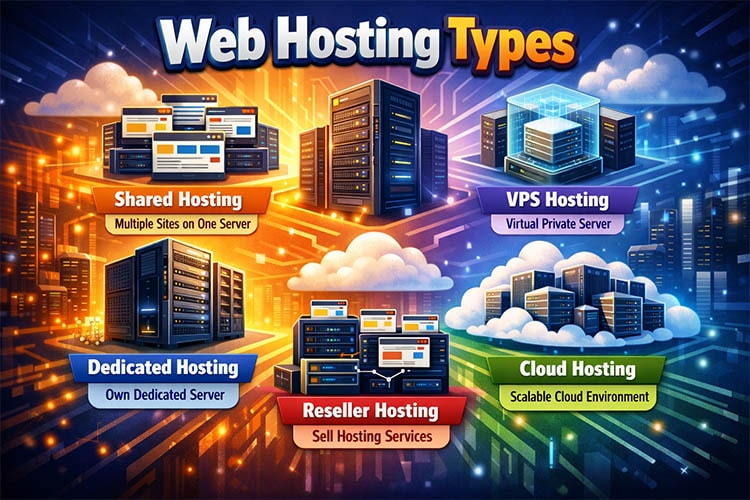
Hosting environments vary significantly in architecture and capability. Shared hosting places multiple sites on a single server, ideal for beginners and low-traffic projects. Virtual Private Server (VPS) hosting offers isolated resources within a shared physical machine, balancing performance and cost. Dedicated and cloud hosting solutions cater to high-demand applications requiring scalability, redundancy, and advanced control.
Performance factors such as SSD/NVMe storage, CPU allocation, RAM, and server location directly influence page load speed—a critical element for user experience and SEO. Equally important are uptime reliability, security protocols (firewalls, DDoS protection, malware scanning), and automated backups, all of which contribute to a trustworthy online presence.
Choosing the right hosting type depends on your website’s purpose, traffic volume, technical requirements, and growth trajectory. A personal blog has different needs than an e-commerce platform or a SaaS application. Understanding these distinctions ensures your site remains stable, secure, and scalable over time.
For a foundational overview of hosting concepts tailored to newcomers, see our detailed guide on what web hosting is for beginners.
Shared Hosting: Affordable and Beginner-Friendly
Shared hosting is a web hosting model where multiple websites reside on a single physical server, sharing its resources—such as CPU, RAM, storage, and bandwidth—under isolated user accounts. This architecture makes it one of the most cost-effective solutions for launching and maintaining small to medium websites.
Designed with simplicity in mind, shared hosting requires minimal technical knowledge. Users manage their sites through intuitive control panels like cPanel or DirectAdmin, handling tasks such as file uploads, email setup, database management, and security configurations without needing command-line access or server administration skills.
This hosting type is ideal for personal blogs, portfolio sites, small business landing pages, and early-stage e-commerce stores with modest traffic. While performance is generally stable under normal loads, resource usage is capped to ensure fair allocation among all accounts on the server. Sudden traffic spikes from one site won’t typically impact others due to modern resource isolation techniques employed by reputable providers.
Security in shared environments relies on robust server-level firewalls, regular malware scans, and up-to-date software stacks. Although users don’t control the underlying server OS, trusted hosts enforce strict security policies and automated patching to protect all hosted sites.
When evaluating shared hosting, prioritize providers that offer SSD storage, consistent uptime, responsive support, and clear upgrade paths—especially if your project is expected to grow. For deeper insights into how this option fits within the broader hosting landscape, see our comprehensive comparison of web hosting types and their differences.
WordPress Hosting: Optimized for WordPress Sites
WordPress hosting is a specialized hosting environment engineered specifically for websites built on the WordPress platform. Unlike generic shared hosting, it features server configurations, caching mechanisms, and security protocols fine-tuned to meet WordPress’s unique technical requirements.
This optimization begins at the stack level—PHP versions are kept current and compatible, MySQL or MariaDB databases are tuned for WordPress query patterns, and HTTP servers (like Nginx or Apache) are configured to serve dynamic content efficiently. Many providers also integrate object caching, opcode caching, and CDN-ready architectures to reduce page load times significantly.
Security is another critical differentiator. WordPress hosting typically includes automated malware scanning, web application firewalls (WAF) tailored to common WordPress vulnerabilities, and hardening measures against brute-force login attempts and plugin exploits. These layers of protection address the most frequent attack vectors targeting WordPress sites.
Management is streamlined through tools that automate core maintenance tasks: one-click updates for WordPress core, themes, and plugins; scheduled backups with one-click restore; and staging environments for safe development. This reduces the operational burden on site owners while minimizing human error.
Performance gains are especially noticeable on content-heavy or e-commerce WordPress sites, where database efficiency and caching directly impact user experience and conversion rates. When combined with modern storage like SSD or NVMe—as detailed in our comparison of SSD vs. NVMe in hosting—the result is a responsive, resilient foundation for growth.
While WordPress can run on standard shared hosting, a purpose-built environment ensures stability, scalability, and long-term maintainability—especially as traffic and complexity increase.
VPS Hosting: More Power with Virtual Private Servers
VPS (Virtual Private Server) hosting delivers a balanced blend of performance, control, and cost-efficiency by partitioning a physical server into isolated virtual environments. Each VPS operates independently with dedicated CPU, RAM, and storage resources, ensuring consistent performance unaffected by neighboring accounts.
Unlike shared hosting—where resource contention can cause slowdowns—VPS hosting provides predictable performance, making it ideal for growing websites, e-commerce stores, and applications requiring stable infrastructure. Users gain root access or administrative privileges, enabling full customization of the server environment, including OS selection, software stacks, and security configurations.
Modern VPS solutions often include SSD or NVMe storage, automated backups, and optional managed services that handle updates, monitoring, and security hardening. This flexibility allows technical users to fine-tune their setup while giving non-technical site owners the option to delegate complex tasks without sacrificing performance.
VPS is particularly advantageous for WordPress sites with high traffic, custom web applications, or businesses needing scalable resources without the overhead of a dedicated server. As outlined in our guide on the difference between shared hosting and VPS, this tier bridges the gap between affordability and enterprise-grade reliability.
When properly configured, VPS hosting enhances site speed, improves uptime, and strengthens security—key factors that directly influence user experience and SEO performance.
Dedicated Server Hosting: Full Control and Maximum Performance
Dedicated server hosting provides exclusive access to an entire physical server, with all its computing resources—CPU, RAM, storage, and bandwidth—dedicated to a single client. This setup delivers unmatched performance, complete administrative control, and enhanced security, making it the preferred choice for high-traffic websites, enterprise applications, and resource-intensive workloads.
Unlike shared or VPS environments, there is no resource sharing or virtualization overhead. Every component of the server is allocated solely to your projects, ensuring consistent speed, low latency, and predictable behavior under heavy load. This level of isolation is critical for applications requiring real-time processing, large databases, or custom software stacks that demand specific configurations.
With root or full admin access, users can install any operating system, configure firewalls, optimize kernel settings, and deploy specialized software without restrictions. This degree of control is invaluable for developers, IT teams, and businesses with compliance requirements (such as PCI-DSS or HIPAA) that mandate strict infrastructure governance.
Performance is further amplified through hardware choices—modern dedicated servers often feature multi-core processors, ECC memory, RAID-configured SSDs or NVMe drives, and 1 Gbps+ network connectivity. These specifications support mission-critical operations where downtime or slowdowns directly impact revenue or user trust.
While dedicated hosting requires more technical expertise—or investment in managed services—it offers the highest ceiling for scalability and customization in the hosting ecosystem. It is particularly suited for SaaS platforms, large e-commerce stores, gaming servers, media streaming services, and organizations managing multiple high-value domains.
When uptime, data sovereignty, and peak performance are non-negotiable, dedicated server hosting remains the gold standard for professional and enterprise-grade web infrastructure.
Cloud Hosting: Scalable and Reliable Infrastructure
Cloud hosting is a modern web hosting solution that leverages a distributed network of interconnected virtual and physical servers to deliver computing resources on demand. Unlike traditional single-server models, cloud infrastructure dynamically allocates CPU, RAM, and storage across multiple nodes, ensuring high availability, fault tolerance, and seamless scalability.
This architecture eliminates the limitations of hardware dependency. If one server in the cluster experiences failure or high load, traffic and processes are automatically rerouted to healthy nodes—minimizing downtime and maintaining consistent performance. This redundancy is fundamental to achieving enterprise-grade reliability without manual intervention.
Scalability is a defining advantage. Resources can be increased or decreased in real time based on actual usage, allowing websites and applications to handle traffic spikes—such as during product launches or marketing campaigns—without over-provisioning or performance degradation. This pay-as-you-go flexibility also optimizes cost efficiency, especially for businesses with variable workloads.
Cloud hosting environments typically include advanced features like automated backups, integrated CDN support, DDoS mitigation, and granular monitoring tools. Many providers offer managed cloud services that handle security patching, OS updates, and performance tuning, reducing operational overhead while preserving control over application-level configurations.
Performance is further enhanced through technologies such as SSD/NVMe storage pools, load balancing, and containerization-ready platforms. These capabilities make cloud hosting ideal for e-commerce platforms, SaaS applications, media-rich sites, and any project where uptime, speed, and adaptability are critical success factors.
By distributing workloads across a resilient, geographically diverse infrastructure, cloud hosting delivers a robust foundation that aligns with the demands of today’s dynamic digital landscape—balancing power, agility, and reliability in a single solution.
Managed vs. Unmanaged Hosting: What’s the Difference?
The distinction between managed and unmanaged hosting lies in who is responsible for server maintenance, security, and technical operations—not in the underlying hardware or performance capabilities.
In managed hosting, the provider assumes full responsibility for routine server administration tasks. This includes operating system updates, security patching, firewall configuration, malware scanning, backup management, performance monitoring, and often application-level support (e.g., WordPress optimization or database tuning). The user focuses solely on their website or application, while the hosting company ensures the infrastructure remains secure, stable, and up to date.
Unmanaged hosting, by contrast, grants full root or administrative access but places all operational duties on the client. The provider typically guarantees only network connectivity and hardware availability. Everything else—software installation, security hardening, troubleshooting, and recovery—is the user’s responsibility. This model offers maximum flexibility but demands significant technical expertise.
Managed hosting is ideal for businesses, agencies, and developers who prioritize reliability and time efficiency over granular control. It reduces the risk of misconfiguration, minimizes downtime from overlooked updates, and provides expert support during incidents. Unmanaged hosting suits experienced system administrators, DevOps teams, or those running custom software stacks that require non-standard environments.
It’s important to note that “managed” doesn’t mean fully hands-off at the application level unless explicitly stated. Some providers offer tiered management—covering only the OS layer—while others include application support. Always clarify the scope of management before choosing.
Ultimately, the choice hinges on your technical capacity, available time, and risk tolerance. For most users seeking a secure, low-maintenance foundation that supports long-term growth without constant oversight, managed hosting delivers greater operational peace of mind and aligns with best practices for web infrastructure stewardship.
How to Choose the Right Web Hosting Type for Your Needs
Selecting the appropriate web hosting type requires aligning your technical requirements, budget, and growth expectations with the capabilities of each hosting model. The goal is to match your current needs while allowing room for future scalability—without overpaying for unused resources or under-provisioning critical performance.
Start by evaluating your website’s purpose and complexity. A simple blog, portfolio, or brochure site with low traffic typically performs well on shared hosting, which offers affordability and ease of use. However, if you run an e-commerce store, membership platform, or content-rich application, consider VPS or managed WordPress hosting for better resource allocation and optimized performance.
Assess your technical expertise. If you lack server administration skills or prefer to focus on content and business operations, managed solutions—whether shared, VPS, or dedicated—are safer choices. They include proactive maintenance, security updates, and expert support. Unmanaged options are best reserved for developers or IT teams capable of handling system-level tasks independently.
Consider traffic volume and predictability. Sites with steady or seasonal traffic spikes benefit from scalable environments like cloud or VPS hosting, where resources can be adjusted without migration. Dedicated servers suit consistently high-traffic applications requiring guaranteed hardware performance and full control.
Security and compliance also influence the decision. Businesses handling sensitive data (e.g., financial or health information) often require isolated environments—such as VPS or dedicated servers—with customizable firewalls, private networks, and audit-ready configurations.
Finally, factor in long-term costs. While shared hosting is inexpensive upfront, frequent upgrades due to performance bottlenecks can lead to higher cumulative expenses. Investing in a slightly more robust plan early—like a scalable VPS or managed cloud instance—can provide better value over time.
The right choice balances performance, control, support, and cost. By objectively analyzing your project’s demands today and its potential tomorrow, you can select a hosting solution that supports stability, security, and sustainable growth.
Frequently Asked Questions About Web Hosting Types
What’s the main difference between shared and VPS hosting?
Shared hosting places multiple websites on a single server with shared resources, while VPS hosting partitions the same physical server into isolated virtual environments, each with dedicated CPU, RAM, and storage—offering better performance and control.
Do I need managed hosting?
If you lack server administration experience or prefer to focus on your website rather than infrastructure maintenance, managed hosting is recommended. It includes security updates, backups, monitoring, and technical support, reducing operational risk.
Is cloud hosting more reliable than traditional hosting?
Yes, in most cases. Cloud hosting distributes resources across multiple servers, providing redundancy. If one node fails, others compensate automatically—resulting in higher uptime and resilience compared to single-server setups.
When should I consider a dedicated server?
Choose a dedicated server when you require maximum performance, full root access, strict security isolation, or compliance with regulatory standards. It’s ideal for high-traffic sites, enterprise applications, or custom software stacks.
Can I switch hosting types later?
Yes, most hosting providers support migration between plans. However, moving from shared to VPS or dedicated may require technical adjustments. Planning ahead minimizes disruption and ensures smoother transitions.
Does WordPress need special hosting?
While WordPress runs on standard hosting, optimized WordPress hosting includes performance tuning, caching, security hardening, and automated updates—enhancing speed, stability, and protection against common vulnerabilities.
Are free hosting services a good option?
Free hosting often lacks reliability, security, and support. It may include ads, limited bandwidth, and no backup options—posing risks to data integrity and user experience. For any serious project, paid hosting is strongly advised.
Frequently Asked Questions (FAQ)
What is the cheapest type of web hosting?
Shared hosting is typically the most affordable web hosting option, making it ideal for beginners, small websites, or personal blogs with low to moderate traffic. Prices often start as low as $2–$5 per month.
Which web hosting type is best for WordPress?
WordPress hosting is specifically optimized for WordPress sites, offering features like automatic updates, enhanced security, and server configurations tuned for WordPress performance. While you can run WordPress on shared or VPS hosting, managed WordPress hosting delivers the best experience for most users.
When should I upgrade from shared hosting to VPS?
Consider upgrading to VPS hosting when your website experiences consistent traffic growth, slower load times, or resource limitations on shared hosting. VPS provides dedicated resources and better performance without the high cost of a dedicated server.
Is cloud hosting better than shared hosting?
Cloud hosting offers greater scalability, reliability, and performance compared to shared hosting because it uses multiple servers instead of a single physical machine. It’s better suited for websites with fluctuating traffic or those requiring high uptime—but it usually costs more than basic shared plans.
What’s the difference between managed and unmanaged hosting?
Managed hosting includes full technical support, server maintenance, security updates, and software management handled by the provider. Unmanaged hosting gives you full control but requires you to manage all server tasks yourself—ideal only if you have technical expertise.
Do I need a dedicated server for my business website?
Most small to medium business websites don’t need a dedicated server. Shared, WordPress, or VPS hosting is sufficient unless you handle high traffic, sensitive data, or custom applications that require full root access and maximum performance.
Can I switch hosting types later?
Yes, most hosting providers allow you to upgrade or change your hosting plan as your needs evolve. Many offer migration assistance, especially when moving to higher-tier plans like VPS or dedicated hosting.
Which hosting type offers the best performance?
Dedicated server and high-end cloud hosting typically deliver the best performance since they provide exclusive or highly scalable resources. However, for most websites, optimized VPS or managed WordPress hosting offers excellent speed and reliability at a lower cost.
Is VPS hosting suitable for beginners?
Unmanaged VPS hosting requires technical knowledge of server administration, but many providers now offer managed VPS plans that handle setup, security, and maintenance—making them beginner-friendly while still offering more power than shared hosting.
How does cloud hosting handle traffic spikes?
Cloud hosting automatically allocates additional resources from a network of servers during traffic surges, ensuring your site stays online and performs well. This elasticity makes it ideal for e-commerce stores, seasonal campaigns, or viral content.

